

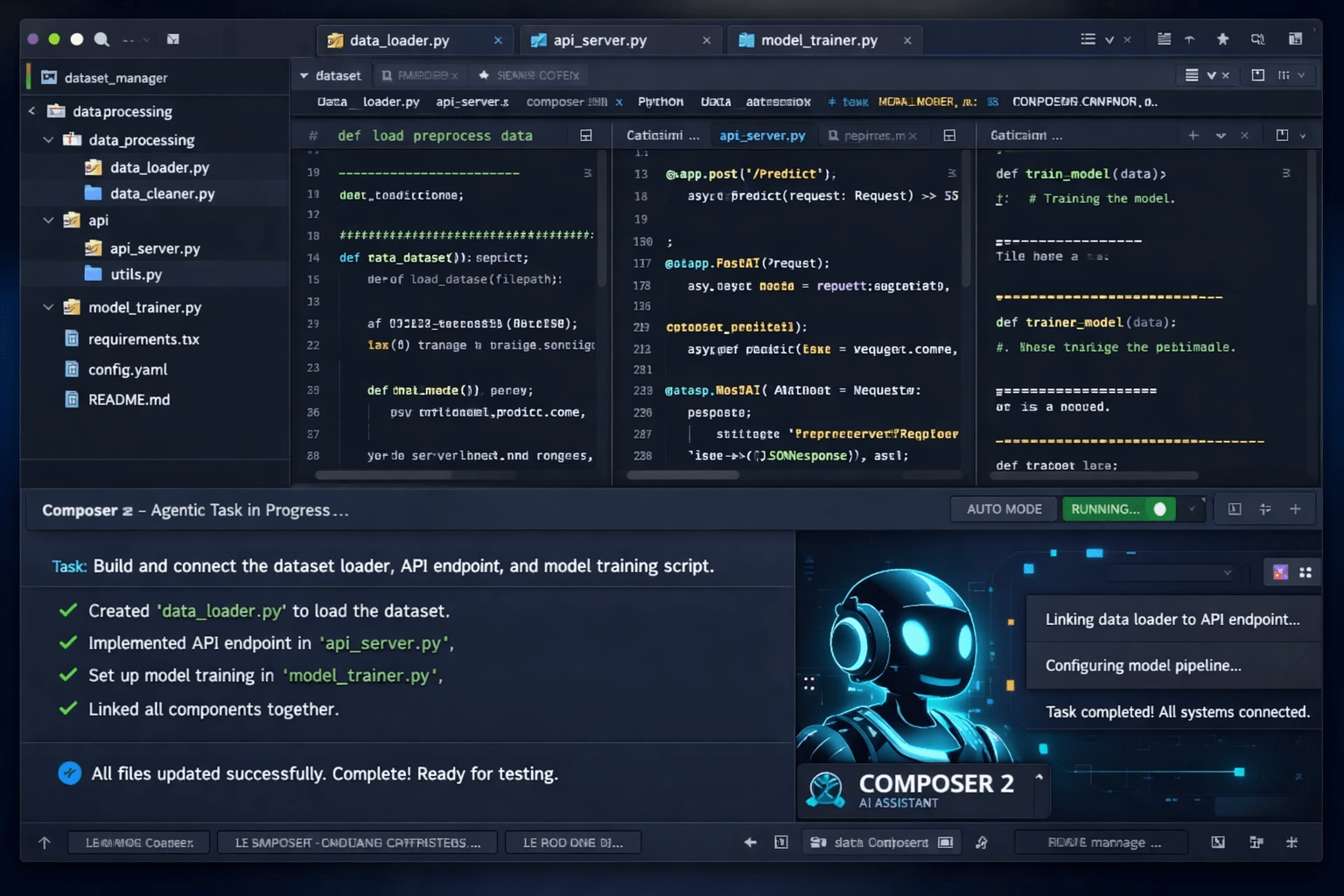
Cursor AI is an AI-first code editor built on top of VS Code that lets you write, edit, and build software using plain English. It reads your entire codebase – not just one file – and uses AI models like Claude and GPT-4o to suggest code, fix bugs, and build full features. Over 1 million developers use it daily in 2026. It just crossed $2 billion in annual revenue. And it is widely considered the most powerful AI coding tool you can use right now.
| About Cursor AI | Details |
|---|---|
| What is it? | AI-first code editor – a VS Code fork with deep AI built in |
| Founded | 2022 by Anysphere Inc. — San Francisco |
| CEO | Michael Truell, 25 years old, MIT graduate |
| Daily Active Users | 1 million+ |
| Annual Revenue | $2 billion+ (doubled in 3 months, as of March 2026) |
| Company Valuation | $29.3 billion (Series D, November 2025). Talks ongoing at $50B. |
| Notable Customers | Stripe, Figma, 50,000+ businesses, 90%+ of Fortune 500 |
| AI Models Available | Cursor Composer 2 (own model), Claude Sonnet, GPT-4o, Gemini, custom API |
| Free Plan? | Yes – Hobby plan. No credit card needed. |
| Paid Plans | Pro $20/mo · Pro+ $60/mo · Ultra $200/mo · Teams $40/user/mo |
| Latest Big Feature | Composer 2 model + Always-On Automations (March 2026) |
| Platform | Windows, macOS, Linux + JetBrains IDEs (March 2026) |
Table of Contents
I’ll be honest with you. When I first heard developers going crazy about Cursor AI on Reddit and Twitter, I thought it was hype.
Every few months, there’s a new AI tool that “changes everything.” Most of them don’t.
But Cursor is different. And the numbers prove it.
In 2024, it was a scrappy startup. By early 2026, it had over 1 million daily users, more than 50,000 business customers, including Stripe and Figma, and had just crossed $2 billion in annual revenue – doubling that number in just three months. Fortune magazine called the 25-year-old CEO Michael Truell “Gen Z’s Patrick Collison.”
That is not hype. That is a product people keep paying for because it actually works.
So I did a deep research dive into everything Cursor AI — the changelog, the Bloomberg reporting, the latest March 2026 product launches, developer reviews — and I’m giving you the most up-to-date, honest breakdown anywhere.
No fluff. No “revolutionary AI.” Just the real picture.
What is Cursor AI, really?
Cursor AI is a code editor. Specifically, it is a fork of Visual Studio Code — built on the same foundation as VS Code, with the same interface, the same extension support, and almost identical keyboard shortcuts.
The difference is what happens under the hood.
In VS Code with Copilot, AI looks at the file you have open and suggests the next line or two. It sees a narrow window of your code.
Cursor works differently. When you open a project in Cursor, it indexes your entire codebase. Every file. Every function. Every dependency. The AI understands the whole architecture of your project — not just the 50 lines on screen. So when you ask it to add a feature or fix a bug, it understands what that change actually means for the rest of your code.
That sounds like a small technical difference. It is not. It is the difference between autocomplete and a coding partner.
Cursor was founded in 2022 by Anysphere Inc. in San Francisco. It raised a $2.3 billion in Series D in November 2025 and is currently in talks for a new round at a $50 billion valuation, according to Bloomberg reporting from March 2026.
How does Cursor AI actually work?
There are three main ways you interact with Cursor. Each one is more powerful than the last.
1. Tab Completion (Supermaven)
This is Cursor’s always-on autocomplete. It uses a technology called Supermaven that predicts multiple lines of code ahead — entire functions, not just the next character. It watches your coding patterns across your whole project. Developers who switch to Cursor consistently say this is the feature they miss most if they ever go back to anything else. It genuinely feels predictive.
2. Chat Mode
Press Cmd+L (or Ctrl+L on Windows) and a chat panel opens. Ask anything about your codebase: “Why is this throwing an error?”, “What does this class actually do?”, or “How do I add rate limiting here?” Cursor pulls the relevant files into context and gives you answers grounded in your actual code — not generic documentation. You can apply code changes directly from the chat with one click.
3. Agent Mode (Composer)
This is the real headline feature. You describe what you want to build in plain English. Cursor’s AI agent then takes over — creating files, editing existing ones, running terminal commands, and iterating until the task is complete. You watch it work in real time. It shows you exactly which files it is touching and why. At any point, you can step in, redirect it, or reject changes you don’t like.
For context on how powerful this is: about 35% of Cursor’s own internal pull requests are now generated by agents, according to the company. That tells you a lot about how much they trust their own tool.
What is Composer 2? Cursor’s brand new AI model (March 2026)
This is the biggest Cursor news right now — and most people haven’t caught up with it yet.
On March 19, 2026, Cursor launched Composer 2: its own proprietary AI model trained entirely on code data.
Until now, Cursor was a brilliant interface layered on top of other companies’ models — Claude from Anthropic, GPT from OpenAI, Gemini from Google. That made Cursor dependent on them for the core AI capability.
Composer 2 changes that. It is a code-only model, Cursor trained internally, built specifically for multi-file edits, long-running tasks, and complex refactoring. It has a 200,000-token context window. Cursor priced Composer 2 below rival models, positioning near-frontier coding performance as a cheaper option for heavy developer workloads.
The model will not write you a poem or help with taxes. Cursor co-founder Aman Sanger said the model “won’t help you do your taxes” and “won’t be able to write poems” — Cursor is betting on specialization, not breadth, to compete with larger rivals.
This also reduces Cursor’s dependency on OpenAI and Anthropic, which protects their margins as the AI coding market heats up. Smart move.
💡 What This Means For You
Composer 2 is available now inside Cursor on all paid plans. For most agent tasks, it is cheaper to use than Claude or GPT, and Cursor claims it delivers competitive coding performance. Use Auto mode and let Cursor pick the right model per task to get the best balance of speed, quality, and cost.
The features that make Cursor genuinely different
Full Codebase Indexing
When you open a project, Cursor indexes every file in the background. It builds a semantic map of your entire codebase so that every AI interaction is aware of the full architecture. This is what separates Cursor from Copilot for real professional work on projects with dozens or hundreds of files.
Multi-File Editing with Diff View
When Cursor’s agent makes changes, it shows you a clean before-and-after diff view before applying anything. You review and accept — or reject — changes file by file. Large refactors that normally take half a day become safe and fast because you stay fully in control.
Plan Mode
Before the agent starts coding, Plan Mode lets the AI build a structured plan with you first. It tells you which files it will touch, what the approach is, and what the expected outcome is. Then it waits for your approval before writing a single line. This solves the classic problem of AI agents making unexpected changes that break things downstream.
Always-On Automations (March 5, 2026)
This is the most exciting new feature. Cursor now supports automations for building always-on agents that run based on triggers and instructions you define. Automations run on schedules or are triggered by events from Slack, Linear, GitHub, PagerDuty, and webhooks.
This is a genuinely new category. Not AI you talk to — AI that reacts to your development events automatically in the background.
30+ New Plugins and MCP Support (March 11, 2026)
Cursor added more than 30 new plugins from partners such as Atlassian, Datadog, GitLab, Glean, Hugging Face, monday.com, and PlanetScale. Cursor can now read from, write to, and take actions across more of your stack. Your agents are no longer limited to code files — they can interact with your entire development environment.
JetBrains Support (March 4, 2026)
Cursor is now available in IntelliJ IDEA, PyCharm, WebStorm, and other JetBrains IDEs through the Agent Client Protocol (ACP). Developers who rely on JetBrains can use any frontier model from OpenAI, Anthropic, Google, and Cursor for agent-driven development. This removed one of the last major reasons to pick Copilot over Cursor.
Multi-Model Flexibility
Unlike GitHub Copilot, which mostly locks you into Microsoft and OpenAI’s models, Cursor lets you choose: Claude Sonnet, GPT-4o, Gemini, Composer 2, or bring your own API key. You switch models per task depending on what you need. No other mainstream AI editor gives you this level of control.
Cursor AI vs regular VS Code — what actually changes?
| Feature | Cursor AI | VS Code + Copilot |
|---|---|---|
| Base Interface | VS Code fork — almost identical | VS Code — original |
| AI Integration | Native, built into the core | Plugin layer on top |
| Codebase Context | Full project indexing | Open file + limited workspace |
| Multi-file Editing | Native — Composer | Limited — Copilot Edits |
| Agent Mode | Advanced — full task completion | Moderate — GitHub-native focus |
| Own AI Model | Yes — Composer 2 (March 2026) | No |
| Model Choice | Claude, GPT, Gemini, Composer 2, custom | Mostly Microsoft/OpenAI |
| Always-On Automations | Yes (March 2026) | No |
| Extensions Compatibility | Most VS Code extensions work | Full extension marketplace |
| Starting Price | Free — Hobby plan | Free — Copilot Free tier |
| Switching Effort | ~5 minutes. Settings transfer automatically. | Zero — you’re already here |
The truth: if you use VS Code today, switching to Cursor takes about 5 minutes. Your themes, extensions, and keyboard shortcuts transfer on first launch automatically. You lose almost nothing and gain a dramatically more powerful AI layer underneath everything you do.
Cursor AI pricing — what you actually pay in 2026
Cursor moved to a credit-based pricing system in June 2025. Here is exactly what each plan gives you — explained simply, no jargon.
| Plan | Price | Who It’s For | What You Get |
|---|---|---|---|
| Hobby (Free) | $0/month | Students, beginners, testing | Limited agent requests + limited Tab completions. No credit card needed. |
| Pro | $20/month ($16 billed annually) | Solo developers, freelancers | Unlimited Tab completions + unlimited Auto mode + $20/month credit pool for premium models |
| Pro+ | $60/month | Power users, heavy agent workflows | Everything in Pro + 3x more credits + background cloud agents |
| Ultra | $200/month | Extremely heavy workloads | 20x usage of Pro + priority access to new features |
| Teams | $40/user/month | Engineering teams of 3+ | Pro per seat + admin controls + centralized billing + shared team rules |
| Enterprise | Custom pricing | Large orgs, compliance requirements | SOC 2, SCIM provisioning, audit logs, pooled credits, private deployment |
⚠️ The Credit System — Read This Before Upgrading
Auto mode – where the cursor picks the AI model automatically — is completely unlimited on all paid plans. It does not consume any credits. Your monthly credit pool only applies when you manually select a specific premium model like Claude Sonnet. On a $20 Pro plan, your credits give you roughly 225 Claude requests, 500 GPT requests, or 550 Gemini requests per month. Most developers on Pro never hit the limit because they use Auto mode for the majority of their work. Reserve premium model selection for genuinely complex tasks and your costs will stay completely predictable.
Student deal: If you have a .edu email, you get one full year of Pro free. Just verify your student status on the Cursor website. No catch.
Cursor AI vs GitHub Copilot vs Windsurf — honest comparison
| Feature | Cursor AI | GitHub Copilot | Windsurf |
|---|---|---|---|
| Price (Individual) | $20/month | $10/month | $15/month |
| Free Tier | Yes — Hobby plan | Yes — 50 requests/month | Yes — generous |
| Editor Type | Standalone IDE (VS Code fork) | Plugin — works in any editor | Standalone IDE (VS Code fork) |
| Codebase Context | Full project indexing | Limited workspace | Full project (Cascade) |
| Agent Mode | Advanced — Composer 2 | Moderate | Good — Cascade |
| Own AI Model | Yes — Composer 2 (March 2026) | Partial | Yes |
| Multi-Model Support | Claude, GPT, Gemini, Composer 2, custom | Mostly Microsoft/OpenAI | Own + frontier models |
| JetBrains Support | Yes — March 2026 | Full, mature | No |
| Always-On Automations | Yes — March 2026 | No | No |
| GitHub Integration | Basic | Deep — native | Basic |
| Best For | Complex agentic work, large codebases, non-technical builders | Teams on GitHub, multi-editor, budget | Budget alternative to Cursor |
Choose Cursor if you do serious development on real projects, want the most powerful agent mode available, and are willing to pay $20/month for a tool that will save you multiple hours a week.
Choose GitHub Copilot if you’re on a tight budget, primarily use JetBrains or Vim, or need deep automated GitHub PR workflows. It is also the safest large enterprise choice for companies deep in the Microsoft ecosystem.
Choose Windsurf if you want roughly 80% of Cursor’s capability at a slightly lower monthly price. The best alternative for solo developers and students who find $20/month steep.
Who should actually use Cursor AI?
Cursor is genuinely great for most developers — but it is not for everyone.
Use Cursor if you:
- Code more than 2 hours a day on real, multi-file projects
- Regularly do refactoring or feature work that spans multiple files
- Want an AI agent that can build features from a plain English description, not just autocomplete one line at a time
- Are you a non-technical founder or entrepreneur building apps through vibe coding
- Already use VS Code and want a zero-friction upgrade to a much more capable AI layer
- Need automated background agents that react to GitHub, Slack, or PagerDuty events
Cursor might be overkill if you:
- Only write small, isolated scripts where basic autocomplete is enough
- Are on a very tight budget and only code occasionally
- Need deep automated GitHub integration for things like auto-generating PRs from issues
- Live in Vim or Emacs and do not want to change your editor workflow
The real pros and cons nobody talks about
✅ What’s genuinely great
- Most powerful agent mode of any code editor in 2026 — by a clear margin
- Full codebase indexing makes AI suggestions actually relevant to your project
- Supermaven autocomplete is best-in-class — feels predictive, not reactive
- Multi-model flexibility — switch between Claude, GPT, Gemini, Composer 2
- Zero switching cost from VS Code — same interface, extensions come with you
- Always-on Automations are a genuinely new capability no other editor has
- 30+ MCP plugins let agents work across your whole stack
- Corporate customers now 60% of revenue — this is a stable, long-term business
❌ The honest downsides
- The credit system confused many users when it launched — it took time to stabilize
- Manually selecting Claude or GPT burns through credits fast
- Some individual developers have moved to Claude Code, citing better pricing for their use case
- JetBrains support only launched in March 2026 — still maturing
- Rate limits on Pro frustrate power users pushing agents for hours
- Raising at a $50B valuation — pricing could change as they scale up
How to get started with Cursor AI for free
Getting started takes about 10 minutes. Here is exactly how to do it.
- Download Cursor — Go to cursor.com. Download for macOS, Windows, or Linux. No credit card needed for the free Hobby plan.
- Import your VS Code settings — On first launch, Cursor asks if you want to import your extensions, themes, and keybindings from VS Code. Say yes. It takes 30 seconds, and everything transfers automatically.
- Open a real project — Do not just open a test file. Open an actual project folder you work on. The cursor starts indexing it in the background immediately.
- Start with Tab completion — Just write code like normal. Within minutes, you will notice Cursor is suggesting entire functions, not just single words.
- Try Chat Mode — Press Cmd+L (Mac) or Ctrl+L (Windows). Ask something real: “Why would this cause a memory leak?” or “How do I add error handling here?” Watch it pull context from your actual project automatically.
- Try a small Agent task — Open Composer with Cmd+Shift+I. Describe something small: “Add input validation to this form” or “Write unit tests for the login function.” Review every change in the diff view before accepting it.
💡 Pro Tip for Beginners
Start agent tasks small and focused. A task like “refactor this single function to handle errors properly” teaches you how to work with diffs safely. Once you’re comfortable reviewing and accepting changes, scale up. Commit to Git often — so you can always roll back if the agent does something unexpected. Small steps, big leverage.
Cursor AI and vibe coding – what’s the connection?
If you’ve read my article on what is vibe coding, Cursor is one of the primary tools that made it real.
Vibe coding is the practice of building software by describing what you want in natural language – no traditional line-by-line programming required. Bloomberg directly credited Cursor with helping popularize “a new style of programming known as vibe coding” in their March 2026 reporting on the company.
What makes Cursor better for vibe coding than most alternatives is the codebase context. When you describe a new feature, Cursor does not generate generic boilerplate that breaks your existing architecture. It looks at how your project is actually built and generates code that fits. That is a huge deal when you’re building something real.
Many non-technical founders and entrepreneurs now use Cursor to build entire products without traditional coding skills. The natural language agent interface has genuinely lowered the barrier to building software — especially when combined with tools like Google AI Studio’s Antigravity for frontend generation.
For the bigger picture of where AI agents like Cursor are heading, my articles on what is an AI agent and what is agentic AI give you the full context. Cursor’s Composer is a perfect real-world example of everything those articles explain.
Is Cursor AI worth it in 2026? My honest verdict
⚡ My Verdict
For developers who code seriously — more than 2 hours a day, on real projects with real complexity — Cursor AI at $20/month is one of the best productivity investments available in 2026.
Here is the most concrete case study I found: Money Forward, a major Japanese fintech, rolled out Cursor company-wide across engineering, QA, design, and product. Engineers saved 15 to 20 hours weekly. QA cut test-generation time 70%. Designers prototyped directly against live frontends. Within one week of introducing Cursor, developer agent adoption jumped 30%.
That is not a marketing slide. That is what happens when a whole team commits to working with AI coding agents the right way. The ROI is not subtle.
For beginners, students, and light users, the free Hobby plan is genuinely useful for evaluation. If you have a .edu email, claim your free Pro year and give it a real month of daily use before deciding.
The one thing I want you to understand before signing up: use Auto mode for 80% of your work. Let Cursor pick the model. Save manually selecting Claude or GPT for the genuinely complex architecture decisions. Do that, and $20/month will feel generous, not limited.
Frequently Asked Questions
Is Cursor AI free to use?
Yes. Cursor has a free Hobby plan with no credit card required. It includes limited agent requests and Tab completions — enough to genuinely evaluate the product. For daily professional use, the Pro plan at $20/month is needed. Students with a .edu email get one full free year of Pro by verifying their student status on the Cursor website.
Is Cursor AI better than GitHub Copilot?
For complex multi-file projects and agentic workflows, yes — Cursor is more powerful. It has a full codebase context, more advanced agent mode, and its own proprietary Composer 2 model. GitHub Copilot wins on price ($10/month), broader editor support (JetBrains, Vim, Xcode), and deep GitHub integration. The right choice depends entirely on how you work.
Can non-coders use Cursor AI?
Yes, and many do. Non-technical founders and entrepreneurs use Cursor for vibe coding — describing features in plain English and having the agent build them. The natural language interface makes software development accessible without traditional programming skills. Basic comfort with reviewing code changes helps you stay in control of your project.
What is Cursor Composer 2?
Composer 2 is Cursor’s own proprietary AI model, launched March 19, 2026. It is trained exclusively on code data, has a 200,000-token context window, and is built for multi-file edits, long agent tasks, and complex refactoring. It is cheaper to use than Claude or GPT and delivers competitive coding benchmark performance. Available now inside Cursor on all paid plans.
Is Cursor AI safe for private or enterprise code?
Cursor’s Business plan includes SOC 2 compliance certification. The Enterprise plan adds audit logs, SCIM provisioning, and granular admin controls for organizations with strict security and compliance requirements. If you work on highly sensitive codebases, review Cursor’s enterprise documentation and privacy policy before using it.
How is Cursor AI different from VS Code with GitHub Copilot?
The core difference is context depth. GitHub Copilot, as a plugin, sees the open file and a limited workspace context. Cursor indexes your entire project — every file, dependency, and function — and uses that full context for every interaction. This makes Cursor far more useful for real multi-file projects. It also has native agent mode that can complete tasks across your whole codebase, while Copilot’s agent capabilities remain more limited.
What happened with Cursor’s pricing controversy in 2025?
In June 2025, Cursor replaced its simple “500 fast requests per month” model with a credit-based system where costs vary by AI model chosen. The rollout was rough – many users saw unexpected charges and felt it was poorly communicated. Cursor publicly apologized and offered refunds to affected users. Since then, they added unlimited Auto mode and made the system much clearer. Most Pro users today never hit their credit limit.
Does Cursor AI work with JetBrains IDEs?
Yes, as of March 4, 2026. Cursor is now available in IntelliJ IDEA, PyCharm, WebStorm, and other JetBrains IDEs through the Agent Client Protocol. You need JetBrains version 2025.3.2 or later, the AI Assistant plugin enabled, and the Cursor ACP installed from the ACP Registry. No separate JetBrains AI subscription is needed – authenticate with your existing Cursor account.
How fast is Cursor AI growing?
Extremely fast. Cursor surpassed $2 billion in annualized revenue, with its revenue run rate doubling over the past three months. The company now has more than 1 million daily users, including 50,000 businesses such as payment processing firm Stripe and creative software maker Figma. Corporate customers now account for roughly 60% of revenue, which gives the business more stability and predictability going forward.
Can Cursor AI agents work automatically without me having to ask?
Yes, as of March 5, 2026. Cursor’s new Automations feature lets you build always-on agents that activate based on triggers — a GitHub push, a Slack message, a PagerDuty alert, a scheduled timer, or a webhook. This is genuinely agentic behavior: AI that reacts to events in your development environment, not just AI that responds when you type a question.
📌 Key Takeaways
- Cursor AI is a VS Code fork with AI built into its core. It indexes your entire codebase — not just the open file.
- It has 1 million+ daily users, $2 billion in annual revenue doubling every 3 months, and a $29.3 billion valuation. This is a real, fast-growing business.
- Composer 2 — launched March 19, 2026 — is Cursor’s own coding model. Cheaper than Claude or GPT, delivering competitive coding performance.
- Agent mode (Composer) lets you describe a feature in plain English and have the cursor edit multiple files simultaneously. Most powerful agentic coding workflow available in 2026.
- Always-on Automations let agents react to GitHub, Slack, PagerDuty, and webhook events automatically — a genuinely new capability no competitor has yet.
- Pricing starts free. Pro is $20/month. Use Auto mode (unlimited) for everyday work and save premium model credits for complex tasks.
- JetBrains support launched March 4, 2026 — removing the last major reason to pick Copilot over Cursor for Java and multi-language developers.
- For vibe coders and non-technical builders, Cursor is the most practical way to build real software using natural language descriptions in 2026.
Related Articles
AI CodingWhat is Vibe Coding? Build Apps Without Code — Best Tools and How to Start Free (2026)
AI Coding Google AI Studio Vibe Coding: Build Full-Stack Apps Free With Antigravity + Firebase
AI Agents What Is an AI Agent? How They Work, Types and Free Tools to Try Today (2026)
AI Agents What Is Agentic AI? How It Works, Real Examples and Why It Matters in 2026
AI Productivity What Is Agentmaxxing? How Anyone Can Work Like a Team of 5
AI Models Claude AI vs ChatGPT (2026): Honest Comparison With Real Pricing
Sources
- Cursor Changelog — cursor.com/changelog — Accessed March 26, 2026
- Cursor Blog — cursor.com/blog — Accessed March 26, 2026
- TechCrunch — “Cursor has reportedly surpassed $2B in annualized revenue” — March 2, 2026 — techcrunch.com
- Bloomberg — “AI Coding Startup Cursor Plans New Model to Rival Anthropic, OpenAI” — March 19, 2026
- Fortune — “The rise and uncertain future of $29 billion AI coding startup Cursor” — March 24, 2026
- WinBuzzer — “Cursor Unveils Composer 2 for Cheaper AI Coding” — March 20, 2026 — winbuzzer.com
- Releasebot — “Cursor Release Notes: March 2026 Latest Updates” — March 23, 2026 — releasebot.io
- The Agency Journal — “Cursor March 2026 Updates: JetBrains, Plugins, and Agent Improvements” — theagencyjournal.com
- PRNewswire — “WordPress.com MCP Write Capabilities — Claude, ChatGPT, Cursor” — March 20, 2026
- Mercury News / Bloomberg — “SF-based AI coding startup Cursor plans new model to rival Anthropic, OpenAI” — March 20, 2026

Leave a Reply