

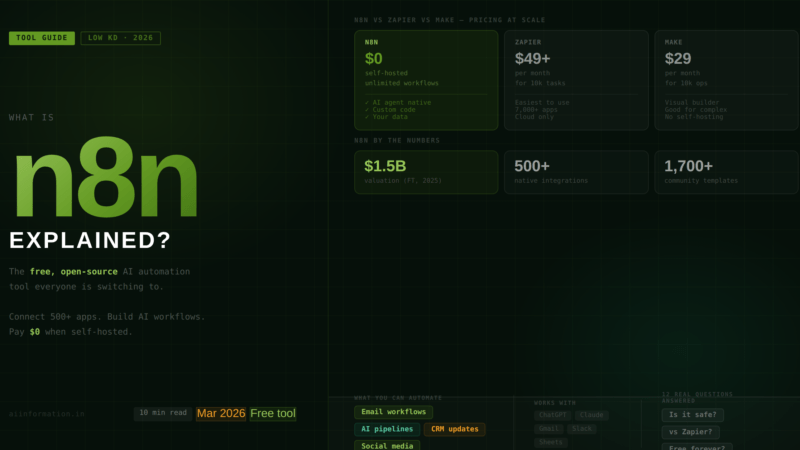
Quick Answer – What Is n8n? n8n (pronounced n-eight-n) is a free, open-source workflow automation tool that connects your apps, automates repetitive tasks, and lets you build AI-powered workflows — without writing code.
Think of it as the brain that connects all your tools: Gmail, Slack, Google Sheets, ChatGPT, your CRM, your website – and makes them work together automatically.
The biggest reason everyone is switching to n8n in 2026: it is free to self-host with unlimited workflows, while Zapier charges per task and gets expensive fast. n8n reached a $2.3 billion valuation (August 2025) (Financial Times) and has over 500 integrations and 1,700+ community templates ready to use immediately.
Table of Contents
Why Everyone Is Suddenly Talking About n8n
Six months ago, I asked a developer friend why he kept mentioning n8n in every automation conversation. His answer was blunt: “Because it does everything Zapier does for a fraction of the price and I own my own data.”
That answer kept coming up as I researched this article. Over and over. Developer after developer, business owner after business owner, saying roughly the same thing: n8n gives you the power of expensive enterprise automation tools, for free, with no per-task fees, and complete control over where your data goes.
That is not a small thing. Workflow automation costs at scale on Zapier can reach hundreds of dollars per month. On n8n, self-hosted, the same automation costs the price of a cheap server: around $5–20 per month.
And in 2026, with AI agent workflows becoming the standard way to run business processes, n8n has evolved into something even more significant. It is no longer just an automation tool. It is one of the primary platforms where people build agentic AI – AI that acts, not just answers.
One developer put it perfectly on the n8n community forum: “n8n was the big unlock. Tools like ChatGPT and Claude are great, but n8n is the thing that allows you to integrate AI into your work and your processes in a safe and controlled way.”
If you have been hearing about n8n and want to understand what it actually is, what it costs, and whether it is right for you – this is the guide that answers all of it.
What Is n8n – The Clearest Explanation
n8n is a workflow automation platform. That sounds technical, so let me make it concrete.
Right now, in your work or personal life, there are things you do repeatedly that follow the same pattern every time. Someone fills in a form – you copy the data into a spreadsheet. A new email arrives from a client – you create a task in your project management tool. You publish a blog post – you manually share it on LinkedIn, Twitter, and Slack. A customer places an order – you update your inventory, send a confirmation, and notify your team.
Every one of those is a workflow. A series of steps that happen in a predictable sequence. And every one of them is something n8n can do automatically, in seconds, without you touching it.
n8n connects your tools – over 500 of them – through a visual drag-and-drop interface. You see the workflow as a diagram on screen. You connect the apps. You define the logic. You activate it. It runs by itself from that point on, every time the trigger condition is met.
What makes n8n different from every other automation tool:
- It is open source. The code is public. You can self-host it on your own server for free. No vendor lock-in. No per-task fees. No one else has your data unless you choose cloud hosting.
- It handles complexity that Zapier cannot. Branching logic, loops, custom JavaScript or Python code, direct database connections, API calls to any service – all inside the same workflow.
- It has native AI support. Connect to OpenAI, Claude, Gemini, or local AI models. Build workflows where AI makes decisions inside the automation. This is what makes n8n the platform of choice for agentic AI workflows in 2026.
- It is priced per execution, not per step. A 50-step workflow that runs once counts as one execution, not 50 tasks. At scale, this difference is enormous.
The name: n8n stands for “nodemation” – node plus automation. The “8” represents the eight letters between the first n and the last n. Pronounced n-eight-n. Now you will never have to search “how do you say n8n” again.
How n8n Works (Plain English, No Tech Degree Required)
Every workflow in n8n is built from three types of pieces:
1. Triggers — What Starts the Workflow
A trigger is the event that kicks off the automation. Examples: a new email arrives in Gmail. Someone fills in a form on your website. A new row is added to a Google Sheet. A webhook fires from an external service. A scheduled time is reached (every day at 9am, for example). Without a trigger, nothing happens. The trigger is always the first piece in any n8n workflow.
2. Nodes – What the Workflow Does
After the trigger fires, the workflow moves through a series of nodes. Each node is one action or decision. A node might: fetch data from a database, send an email, call the OpenAI API, check a condition (if X is true, do Y; if not, do Z), transform data from one format to another, post a message to Slack, or write a row in a spreadsheet. You can have as many nodes as you need. Two nodes or two hundred nodes — one execution either way.
3. Connections – How Data Flows
Data flows from node to node through connections. The output of one node becomes the input of the next. You can see exactly what data is passing at every step, which makes debugging straightforward. If something goes wrong, n8n shows you exactly where it failed and what the data looked like at that point.
What It Looks Like in Practice
Here is a real example. A small business owner sets up this workflow: when a new contact is added to their CRM (trigger), n8n enriches the contact data by searching for the person’s company on the web (node 1), passes that data to ChatGPT to write a personalised outreach email (node 2), saves a draft in Gmail (node 3), and posts a notification in their Slack channel (node 4). The whole thing takes about 20 minutes to build. After that, it runs automatically every time a new contact is added. Forever. Without them touching it.
The key insight about n8n that most beginners miss: you do not need to code to use it, but you can code if you want to. For 90% of use cases, the visual drag-and-drop interface is everything you need. For the 10% where you need something custom, you can write JavaScript or Python directly inside a node. Most automation tools force you to choose between visual and code. n8n gives you both.
n8n vs Zapier vs Make – Honest Comparison Table
This is the most searched comparison, so here is the full picture without the marketing spin from any of these companies.
| Feature | n8n | Zapier | Make (Integromat) |
|---|---|---|---|
| Open source? | Yes — fair-code licence | No | No |
| Self-hosting? | Yes — free unlimited | No | No |
| Free tier | Unlimited (self-hosted) or free trial (cloud) | 100 tasks/month | 1,000 operations/month |
| Pricing model | Per execution (whole workflow = 1) | Per task (each step = 1 task) | Per operation (each step counts) |
| Paid plans start at | ~$24/month (cloud) or $0 (self-hosted) | ~$20/month | ~$9/month |
| Integrations | 500+ native + any API via HTTP | 7,000+ native | 2,000+ native |
| AI / agent support | Native AI Agent node, LangChain, all major LLMs | AI Actions, Copilot for building Zaps | AI scenarios (October 2025) |
| Custom code? | Yes — JavaScript and Python inside nodes | Limited (Code by Zapier) | Limited |
| Complex branching logic | Full support | Limited, linear flows | Good visual branching |
| Data privacy | Full control when self-hosted | Cloud only — data on Zapier servers | Cloud only |
| Learning curve | Moderate — assumes some technical comfort | Very easy — built for non-technical users | Medium — visual but complex |
| Community templates | 1,700+ | Large library | Large library |
| Valuation / size | $2.3 billion valuation (August 2025) | $5 billion | Part of Celonis ecosystem |
| Best for | Technical teams, developers, AI workflows, budget-conscious | Non-technical users, simple automations, speed | Visual thinkers, complex logic, mid-market |
The Cost Difference That Makes People Switch
This is where the comparison gets really clear. A medium-complexity workflow with 10 steps that runs 1,000 times per month:
- Zapier: 10,000 tasks consumed — requires the $49+/month plan
- Make: 10,000 operations — requires the $29/month plan
- n8n (self-hosted): 1,000 executions — costs ~$5–20/month for the server. That’s it.
The savings compound dramatically as automation volume grows. Teams running high-volume workflows consistently report switching from Zapier to n8n and cutting their automation costs by 70–90%.
When to Choose Each One
Choose Zapier if: you are non-technical, your workflows are simple and low-volume, speed of setup matters more than cost, and you are fine with paying a premium for convenience.
Choose Make if: you want complex visual workflows without technical setup, you are comfortable with a learning curve, and you want better pricing than Zapier without full self-hosting.
Choose n8n if: you have some technical comfort, you care about data privacy, you need AI-native workflow capabilities, your automation volume is high, or you want to build agentic AI systems without paying per task.
n8n Pricing – What It Actually Costs in 2026
n8n pricing confuses people because there are two completely different versions: self-hosted and cloud. Here is the full picture.
Self-Hosted (Free – Community Edition)
This is the version most developers and technical users run. You download n8n from GitHub and run it on your own server. The Community Edition is completely free: unlimited workflows, unlimited executions, all 500+ integrations, full code support. Your data never leaves your infrastructure.
The catch: you need to manage the server yourself. That means handling updates, backups, and troubleshooting. For most teams, a VPS (virtual private server) costing $5–20/month is sufficient for moderate automation workloads. Total cost: $5–20/month in server costs. Zero licensing fees.
n8n Cloud Plans (Managed Hosting)
| Plan | Price | Executions/month | Best for |
|---|---|---|---|
| Free trial | Free (14 days) | Full access | Testing before committing |
| Starter | ~$24/month | 2,500 | Individuals, light use |
| Pro | ~$60/month | 10,000 | Small teams, growing workflows |
| Business | ~$800/month | 40,000 + SSO + Git | Enterprise, compliance teams |
| Enterprise | Custom | Custom | Large organisations |
Important thing to understand about n8n’s execution model: unlike Zapier which counts each step in a workflow as a separate “task,” n8n counts each full workflow run as one execution — regardless of how many steps it contains. A 50-step workflow running 100 times = 100 executions. The same workflow on Zapier = 5,000 tasks. This pricing difference is massive at scale.
Watch out for: polling workflows (workflows that check for new data at regular intervals) consume executions fast. A workflow checking your email every 10 minutes runs 4,320 times per month. On the Starter plan, that alone would exhaust your 2,500 execution limit. If you plan to use polling triggers heavily, self-hosting is the significantly better choice.
5 Beginner Automation Ideas You Can Build in n8n Today
Theory is useful. Examples are better. Here are five real automations that beginners build in their first week with n8n — none of them require coding.
Automation 1 – New Contact to CRM + Welcome Email
Trigger: New form submission on your website
What it does: Automatically creates a contact in your CRM (HubSpot, Airtable, Notion — your choice), sends a personalised welcome email from Gmail, and posts a notification to your team Slack channel.
Time to build: 15–20 minutes
Time saved: 5–10 minutes per new contact
Automation 2 — AI-Powered Social Media Posting
Trigger: New blog post published on your website
What it does: Sends the article to the OpenAI node, which writes platform-optimised versions for LinkedIn and Twitter/X, then schedules and posts both automatically.
Time to build: 30–45 minutes
Time saved: 20–30 minutes per post
Automation 3 — Daily News Digest to Email
Trigger: Every morning at 8am
What it does: Fetches latest articles from 3–5 RSS feeds in your niche, passes them to an AI node to summarise the most important stories, and sends you a clean daily briefing email.
Time to build: 20 minutes
Time saved: 30+ minutes of news scanning every morning
Automation 4 — Lead Qualification Workflow
Trigger: New lead added to Google Sheet or CRM
What it does: Enriches the lead’s data by searching their company online, passes the enriched profile to an AI node to score the lead (high/medium/low priority), routes high-priority leads to your sales Slack channel immediately, and adds medium/low leads to a follow-up sequence.
Time to build: 45–60 minutes
Time saved: 2–3 hours of manual lead research per week
Automation 5 — Invoice and Payment Tracking
Trigger: New invoice created in your billing tool
What it does: Adds the invoice to a Google Sheet tracker, sends the client a confirmation email, sets a reminder to follow up if unpaid after 7 days, and notifies your Slack when payment is received.
Time to build: 30 minutes
Time saved: Manual tracking, follow-up emails, and payment chasing
The pattern you will notice: every one of these automations connects 3–5 tools that you already use. n8n does not replace your tools. It makes them talk to each other so you do not have to be the person in the middle copying data from one to another.
n8n + AI: How to Build Agentic Workflows
This is what has made n8n the go-to platform for agentic AI in 2026. The AI Agent node.
n8n’s AI Agent node lets you build workflows where AI does not just generate text — it makes decisions, uses tools, and takes actions. You connect it to OpenAI, Claude, Gemini, or a local model. You give it access to tools like web search, Google Calendar, Gmail, or a database. You define the goal. The agent figures out the steps.
Here is what that looks like in practice:
A content agency built an n8n workflow where an AI agent: monitors specific industry RSS feeds for trending topics, evaluates each article for relevance to their niche, selects the top 3 most relevant stories, writes a brief social post for each in the brand voice, schedules them across LinkedIn and Twitter, and posts a weekly summary to the team Slack. One human set it up. Zero humans run it. It produces consistent output every day.
This is agentic AI in practice — not a chatbot answering questions, but an autonomous workflow completing real business tasks. And n8n is one of the primary tools making it accessible without an engineering team.
n8n supports connections to: OpenAI (GPT-4o, o1), Anthropic (Claude), Google Gemini, Mistral, DeepSeek, and local models via Ollama. You do not pay n8n for AI usage. You pay your AI provider directly at their standard API rates. n8n just handles the plumbing.
How to Get Started With n8n (Step by Step)
There are two paths depending on your technical comfort level.
Path 1 — n8n Cloud (Easiest, No Technical Setup)
Step 1: Go to n8n.io and click “Get started for free.” You get a 14-day free trial of the Pro plan. No credit card required for the Starter trial.
Step 2: Create your first workflow. Click “New Workflow” → search for a trigger (start with “Gmail” or “Schedule” if you are testing) → add an action node → connect them → activate.
Step 3: Use a template. Click “Templates” in the left menu. You will see 1,700+ pre-built workflows. Find one close to what you want to automate, import it, connect your own credentials, and activate. Most templates work in under 10 minutes.
Step 4: Connect your apps. Each node that touches an external app (Gmail, Slack, Google Sheets) needs you to connect your account once. After that, every workflow using that app uses the same connection automatically.
Path 2 — Self-Hosted (Free, Full Control)
This route requires basic comfort with a command line. But it gives you unlimited workflows and zero execution fees forever.
Step 1: Get a server. A $5–10/month VPS on DigitalOcean, Hetzner, or Vultr is enough for most individuals and small teams. If you already use Docker on your computer, you can run n8n locally first to test.
Step 2: Install n8n with Docker. On your server, run:
docker run -it –rm –name n8n -p 5678:5678 -v n8n_data:/home/node/.n8n n8nio/n8n
That is it. n8n is now running. Open your browser at localhost:5678, create an account, and you are in.
Step 3: Build your first workflow. Same process as the cloud version — same interface, same templates, same nodes. The only difference is where it runs and who manages the server.
For complete beginners who want self-hosting without the server management: services like Railway, Render, or Zeabur offer one-click n8n deployment for $5–15/month, handling the infrastructure for you while keeping your data private.
FAQ – People are also asking
What does n8n stand for?
“Nodemation” — node plus automation. The “8” represents the eight letters between the n and the n. Pronounced n-eight-n.
Is n8n better than Zapier?
For technical users who want power, cost control, and AI capabilities: yes. For non-technical users who want to be up and running in 10 minutes without touching a server: Zapier is easier. It depends entirely on your technical comfort and use case.
Does n8n have a free plan?
Yes. The self-hosted Community Edition is free forever with unlimited executions. Cloud plans start at ~$24/month with a 14-day free trial.
What is the n8n community edition?
The free, open-source version of n8n that you run on your own server. It includes all 500+ integrations, unlimited workflows, unlimited executions, and full code support. No licence fee. You just pay for the server to run it on.
Can I use n8n without a server?
Yes – n8n Cloud lets you use n8n fully in the browser without any server setup. It starts at ~$24/month. Alternatively, you can run n8n locally on your own computer for free using Docker, though this only works when your computer is on.
Is n8n really free?
Yes – with important nuance. The self-hosted Community Edition is completely free forever: unlimited workflows, unlimited executions, all integrations. You only pay for the server to run it on ($5–20/month). The cloud version (n8n.io hosted) is not free – it starts at ~$24/month with a 14-day free trial. If “free” means $0 software cost with small infrastructure cost, then yes. If it means zero cost total, that applies only to very light local use.
Do I need to know how to code to use n8n?
No — for the vast majority of automations, the drag-and-drop visual interface is everything you need. No coding required. However, n8n is more technical than Zapier by design. You should be comfortable with concepts like connecting an API, understanding JSON data, and setting up a trigger. If you have never heard of JSON or APIs, expect a 2–4 hour learning curve before your first real workflow is running. The n8n community and 1,700+ templates make that curve shorter than you might expect.
What is the difference between n8n and Zapier?
Three key differences: (1) Price: n8n is free to self-host; Zapier charges per task and becomes expensive fast. (2) Complexity: n8n handles branching logic, loops, custom code, and AI agents that Zapier cannot do. (3) Data ownership: n8n self-hosted means your data never leaves your server; Zapier is cloud-only. The trade-off is ease of use — Zapier is simpler for non-technical users building basic automations.
What is “fair-code” licence and does it matter?
Fair-code is n8n’s custom licence. The short version: you can use n8n for free for anything except building a service that directly competes with n8n’s own hosted product. For individuals, businesses, and developers using n8n for their own automation needs, fair-code means completely free. The only restriction applies to companies trying to sell n8n-as-a-service. For 99% of users reading this, it makes no practical difference — n8n is free to use.
Is n8n safe? Where does my data go?
When self-hosted, your data never leaves your infrastructure. n8n runs entirely on your server. Nothing is sent to n8n’s servers unless you choose the cloud version. For GDPR compliance, healthcare, finance, or any situation where data residency matters, self-hosting is the correct choice. On n8n Cloud, data is stored in Frankfurt, Germany (EU servers). n8n collects basic telemetry (execution counts) on self-hosted instances, but this can be disabled. No workflow content is sent to n8n.
Can n8n replace Zapier completely?
For most use cases, yes — if you are comfortable with a steeper learning curve. Everything Zapier does, n8n can do. Many things n8n can do (custom code, complex branching, self-hosting, AI agents), Zapier cannot. The main reason to stick with Zapier: you are non-technical and want to be up and running in 10 minutes with zero server management. The main reason to switch to n8n: you want more power, lower cost, better AI support, or data privacy.
How many integrations does n8n have?
500+ native integrations as of 2026. This is fewer than Zapier’s 7,000+ or Make’s 2,000+. However, this number is somewhat misleading: n8n also includes an HTTP node that connects to any service with a public API, meaning you can effectively connect n8n to anything that has an API, whether it has a native integration or not. For the vast majority of real-world use cases, the 500+ native integrations cover everything needed.
What can you actually automate with n8n?
Practically anything that involves data moving between digital tools. Most common uses: email management and automated responses, CRM updates and lead routing, social media posting and scheduling, customer onboarding workflows, invoice and payment tracking, data syncing between databases, AI content generation pipelines, internal notifications and alerts, e-commerce order processing, and agentic AI workflows that combine multiple tools with AI decision-making. If you can describe it as “when X happens, do Y, then Z,” n8n can automate it.
How hard is it to learn n8n as a complete beginner?
Harder than Zapier, easier than writing code from scratch. Most beginners get their first working workflow in 1–3 hours. Getting comfortable with building complex workflows typically takes 2–4 weeks of regular use. The fastest way to learn: start with a template close to what you need, activate it, see how it works, then modify it. Building from scratch is slower; adapting templates is faster. n8n’s community forum (45,000+ members) and YouTube tutorials significantly reduce the learning curve.
Does n8n work with ChatGPT and other AI tools?
Yes – natively. n8n has built-in nodes for OpenAI, Anthropic (Claude), Google Gemini, Mistral, Cohere, and local models via Ollama. The AI Agent node allows you to build autonomous workflows where AI makes decisions and takes actions inside your automation. You connect your own API key to the AI provider and pay them directly at standard rates. n8n itself does not charge for AI usage. This makes n8n one of the primary tools for building agentic AI workflows without paying premium per-task fees.
What are the biggest mistakes beginners make with n8n?
Three consistent patterns: (1) Jumping into complexity too fast — the most common mistake is trying to build a 15-step AI agent workflow before understanding basic node connections. Start with a 3-node workflow. Master the fundamentals first. (2) Not testing with real data — n8n lets you run test executions with real data before activating a workflow. Most beginners skip this and then wonder why their live workflow behaves differently than expected. (3) Ignoring error handling — workflows fail sometimes. A node timeout, an API rate limit, a missing field. Without error handling built in, your workflow silently fails and you never know. Add an error trigger node to every important workflow from the start.
Can I use n8n to make money / start an AI automation agency?
Yes – and this is one of the most discussed topics in the n8n community right now. An AI Automation Agency (AAA) builds and manages automation workflows for other businesses. n8n is the most popular tool for this because: it is free to self-host, clients’ data stays private, it handles complex enterprise workflows, and you can white-label it. Typical AAA services charge $500–5,000 per workflow build plus $200–1,000/month for maintenance. The n8n community actively shares resources, templates, and business models for running an automation agency. Starting one requires learning n8n well enough to solve real business problems — which takes 1–3 months of dedicated practice.
Key Takeaways
- n8n connects your tools and automates workflows — visual drag-and-drop, no coding required for most automations.
- Free to self-host with unlimited executions. Cloud plans start at ~$24/month. Zapier charges per task and costs far more at scale.
- 500+ integrations plus HTTP nodes for connecting to any API. 1,700+ community templates to start immediately.
- Native AI support — OpenAI, Claude, Gemini, and local models. AI Agent node enables agentic workflows where AI makes decisions inside your automation.
- Valuation: $2.3 billion valuation (August 2025) — this is not a niche tool, it is mainstream infrastructure for technical teams.
- Best for: developers, technical teams, AI automation builders, anyone concerned about data privacy, and anyone running high-volume workflows where Zapier becomes too expensive.
- Start: cloud trial at n8n.io (free 14 days) or self-host with Docker for $0 software cost.
The reason n8n is in every automation conversation in 2026 is simple: it is the most powerful free tool in the space, it handles AI workflows natively, and it gives you complete ownership of your data and your costs. Those three things together are hard to compete with.
What would you automate first if you could set it up once and never touch it again? Drop it in the comments. I read every one and often reply with a specific n8n template or workflow structure for your exact use case.
Want weekly AI tool updates without the noise?
Subscribe to the AI Information newsletter free, every Sunday, no spam.
Related Articles
- What Is Agentic AI? 2026’s Biggest Tech Shift Explained
- What Is an AI Agent? The Complete Guide (2026)
- What Is Vibe Coding? Complete Beginner’s Guide (2026)
Sources and References
- n8n — Official Pricing Page 2026
- n8n — AI Agents on n8n
- Financial Times — n8n reaches $2.3 billion valuation (August 2025)
- HatchWorks AI — n8n Guide 2026
- Zapier — n8n Pricing Analysis
- Digidop — n8n vs Make vs Zapier 2026
- Digital Applied — Automation Comparison 2026
- ConnectSafely.ai — n8n Cloud Pricing Guide

Leave a Reply