

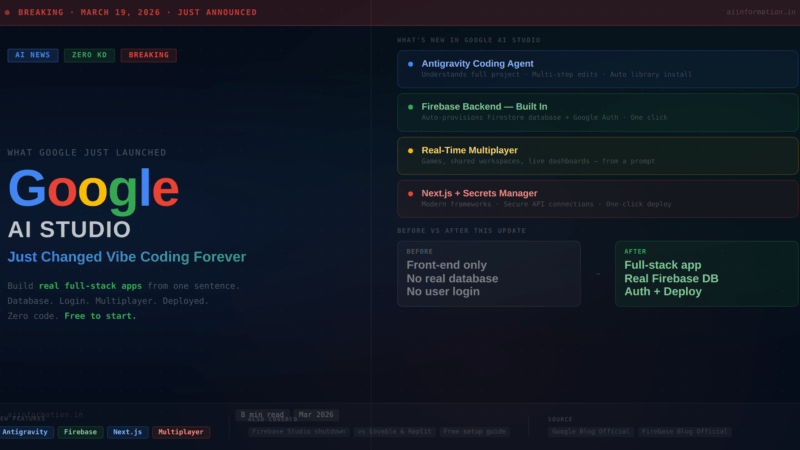
Quick Answer – On March 19, 2026, Google launched a completely rebuilt vibe coding experience inside Google AI Studio. It is powered by a new AI agent called Antigravity and comes with Firebase built directly in.
For the first time, you can describe an app in plain English and get something that actually works in the real world – with a real database, real user login, real-time multiplayer, and secure API connections. Built and deployed automatically.
The biggest criticism of vibe coding since it started – that it could only build pretty front-ends with no real backend – Google just answered it directly.
Free to try at aistudio.google.com. Google account required.
Table of Contents
My Honest Take on This Announcement
I want to be straight with you about something before we get into the details.
When I wrote the complete guide to vibe coding a few days ago, I included a section on the real risks and limitations. One of the biggest ones was this: vibe coding tools are great at building the front end – the part of an app you can see and click – but they fall apart when you need a real back end. A real database. Real user accounts. The infrastructure that makes actual software work.
I wrote that honestly because it was true.
Yesterday, Google published an announcement that directly addresses exactly that limitation. They rebuilt Google AI Studio around a new agent called Antigravity and connected it natively to Firebase — their production-grade backend platform. The result is that you can now describe an app in plain English and get something with a real database, real user authentication, and real-time multiplayer. Not a prototype. Not a demo. Something you could actually give to real users.
I spent yesterday evening reading the official Google blog post, the Firebase announcement, and several technical deep-dives from developers who tried it on launch day. Here is my honest assessment: this is genuinely significant. Not “AI hype” significant. Actually significant. The gap between vibe-coded prototype and real product just got a lot smaller.
Whether it is the best option for every use case – I will get to that honestly too. There are real limitations worth knowing before you commit to building anything serious on it.
What Actually Changed – In Plain English
Google AI Studio existed before this update. It was a capable tool for experimenting with Gemini models and building basic prototypes. Useful, but limited. The kind of thing you would show someone to demonstrate AI coding capability, not the kind of thing you would actually build a product on.
The March 19, 2026 update changed three things that matter:
First: They integrated the Antigravity agent – a significantly more capable AI coding system that understands your entire project, not just the current file. It plans properly, installs what it needs without being asked, and self-corrects when things break.
Second: They connected Firebase directly into the experience. Firebase is Google’s backend platform – the infrastructure that handles databases and user authentication for real, production apps. Before this update, connecting your vibe-coded app to a real backend required technical knowledge that most non-developers do not have. Now the agent handles it automatically.
Third: They added Next.js support, real-time multiplayer capability, a Secrets Manager for secure API connections, and one-click deployment. The full package for taking an idea from description to live app.
The result is that building something real – not just a prototype that falls apart when you try to add real users – is now within reach for people who cannot write code. That is not a small thing.
What Is the Antigravity Agent?
Antigravity is Google’s AI coding agent. Think of it like a very capable developer who lives inside your browser and does what you describe.
The previous generation of AI coding tools worked at the file level – you would show it one file and ask it to change something. The problem is that real apps are made of dozens of files that all need to be consistent with each other. Change something in one place without updating the others and everything breaks.
Antigravity works at the project level. It understands how everything fits together. When you ask it to add a feature, it figures out every file that needs to change and changes them all consistently. It is the difference between asking a junior developer to edit one function and asking a senior developer to implement a feature.
Google originally launched Antigravity in November 2025 as a standalone tool for developers. What the March 2026 update does is bring its core capabilities into Google AI Studio – the browser-based, free-to-access platform that anyone with a Google account can use.
Here is what Antigravity specifically does that makes it more capable than earlier vibe coding tools:
- It installs external libraries automatically. If your app needs smooth animations, it installs Framer Motion without you asking. If you need icons, it handles that. You never have to know what these tools are called.
- It detects when your app needs a database or login system from the context of what you are building — before you ask for it. It proactively surfaces the option rather than waiting for you to realise you need it.
- It maintains project history across sessions. Earlier versions treated every new session as starting fresh. Now you can come back days later and pick up exactly where you left off.
- It self-corrects when something fails – retrying with a different approach rather than stopping and asking for help.
Google says their internal teams built hundreds of thousands of applications using this system before the public launch. That number is large enough that I take it seriously as a signal that this is production-tested rather than experimental.
The Firebase Integration — Why This Is the Big Deal
If you are not technical, you might be wondering why I keep emphasising Firebase specifically. Let me explain why it matters.
Every real application has two parts. The front end is what you see – the buttons, the design, the layout. The back end is the invisible part that makes it actually work — where your data is stored, how users log in securely, how multiple users interact with each other.
Previous vibe coding tools were excellent at the front end. Ask Lovable or Replit to build a beautiful task management interface and they would do it impressively. But the moment you said “I want users to be able to create accounts and save their tasks,” things got complicated. You needed to connect a separate backend service. Configure it manually. Write database rules. Handle authentication flows. Most non-technical users hit this wall and their project stopped.
Firebase is Google’s production-grade solution for exactly this back-end problem. Major applications around the world use Firebase to handle their databases and user authentication. It is not a toy. It is real infrastructure.
What the new Google AI Studio does is make Firebase invisible. Here is the actual experience:
You describe your app. The Antigravity agent builds it. At the point where it detects that your app needs to store data or manage user accounts, a prompt appears asking you to “Enable Firebase.” You click Enable. The agent then automatically sets up your database, configures user authentication with Google Sign-In, creates your login page, connects your app to all of it, and writes the code that keeps data synced. You made one click. The agent handled everything else.
I want to be clear about what this means in practice. The database the agent provisions is Cloud Firestore – the same database that enterprise applications use for real production data. The authentication is Firebase Authentication — the same system that handles secure user accounts for apps with millions of users. This is not a simplified toy version. It is the real infrastructure, provisioned automatically from a text description.
For anyone who has ever tried to build something with vibe coding and run into the wall of “how do I make users log in” or “where does the data actually live” – that wall is gone with this update.
Every New Feature, Explained Simply
Real-Time Multiplayer
This one surprised me when I read it. Real-time multiplayer – where multiple people interact with the same app simultaneously, seeing each other’s changes instantly — is genuinely hard to build. It requires specific architecture decisions, socket connections, and careful state synchronisation. The fact that you can get this from a text prompt is a significant capability jump. Google demonstrated a multiplayer browser game built entirely from a single description. Working game. Multiple players. Live leaderboard. Real-time sync. From a prompt.
Next.js Support
Previously, Google AI Studio supported React and Angular. Next.js is now added. If you do not know what these are, the short version is: Next.js makes web apps load faster, rank better on Google Search, and handle more complex functionality than basic React. For anyone building anything meant to go public and get found, Next.js is a better foundation. You can select your preferred framework in the Settings panel.
Automatic Library Installation
When I tried earlier vibe coding tools, one of the small frustrations was that the agent would sometimes reference a capability it could not implement because the right library was not installed. Antigravity handles this automatically. If it decides your app needs a specific tool to achieve what you described, it installs it without interrupting you to ask. This sounds small but it significantly reduces the number of times you have to intervene in the building process.
Secrets Manager
This one matters for security. When your app connects to external services – payment processors, mapping tools, email systems – you need API keys. These are essentially passwords. If they end up exposed in your code, they can be exploited by anyone who can read your source files. The new Secrets Manager handles this correctly: the agent detects when an API key is needed, prompts you to enter it securely, and stores it in a way that never exposes it in the code itself. This is the right way to handle credentials and it is good that it is built in by default.
External API Connections
Your app can now connect to services you already use. Stripe for payments. Google Maps for location. Your own existing databases or services. The agent handles the integration once you provide the credentials through the Secrets Manager.
One-Click Deployment via Cloud Run
When you are ready to go live, one click deploys your app through Google Cloud Run – real infrastructure that handles scaling automatically. No server configuration. No Dockerfile. No CI/CD setup. Your app gets a real URL and starts serving traffic.
Code Export
Everything is exportable. Download as a ZIP, push to GitHub, or migrate to Google Antigravity for more developer control. You are never locked in. I always check for this in any vibe coding tool because lock-in is a real risk. Google has handled this correctly.
What You Can Actually Build Now
Google demonstrated several applications built entirely through this system on launch day. I am sharing the ones that stood out to me because they illustrate different aspects of what is now possible:
A Multiplayer Game
Google’s team built a multiplayer first-person laser tag game in a browser. Real-time gameplay. 3D rendering using WebGL. Live matchmaking and leaderboards. Multiple players interacting simultaneously with consistent game state. This is genuinely complex engineering. It was built from a prompt. The fact that this is the same system available to anyone with a Google account is worth sitting with for a moment.
A 3D Collaborative Space
A shared environment where each user’s cursor generates 3D particle effects using curl noise — a specific mathematical effect that creates organic-looking movement. The agent automatically imported Three.js (a 3D rendering library), built the real-time sync logic, and created the shared experience. The person who built this did not know what Three.js was or how real-time sync worked. They described what they wanted and the agent figured out how to achieve it.
Practical Business Applications
These are the ones I think most people reading this will actually care about:
- A business dashboard with monthly sales charts, period filters, and CSV export – with login via company Google account
- A meeting room booking system with an availability calendar and database-backed reservations
- A collaborative document editor where multiple users can edit simultaneously with changes syncing in real time
- An e-commerce prototype with product listings, cart, and payment integration
None of these required any technical knowledge to describe. The descriptions were plain English. The outputs were working applications.
Google AI Studio vs Lovable vs Replit vs Bolt.new
I want to be fair here rather than just declaring Google the winner. Different tools have genuine advantages depending on what you need.
| Feature | Google AI Studio | Lovable | Replit | Bolt.new |
|---|---|---|---|---|
| Backend / Database | Firebase — automatic, production-grade | Supabase integration | Replit Database | Limited |
| User Authentication | Firebase Auth — automatic, one click | Supabase Auth | Manual | Limited |
| Real-Time Multiplayer | Yes — native Firebase Realtime | Limited | Limited | No |
| Frameworks | React, Next.js, Angular, Node.js | React, Next.js | Multiple | React, Next.js |
| AI Model | Gemini 3.1 (latest) | Claude + GPT-4o | Multiple | Claude |
| One-Click Deploy | Yes — Cloud Run | Yes | Yes | Yes |
| Code Export | Yes — ZIP or GitHub | Yes | Yes | Yes |
| Free tier | Yes — free to prototype | Yes — limited | Yes — limited | Yes — limited |
| Beginner experience | Good but improving | Excellent — most polished | Very good | Good |
| Google ecosystem | Native — Maps, Workspace coming | None | None | None |
My honest summary after looking at all of them:
If you want to build something with a real backend – actual user accounts, persistent data, real-time features – Google AI Studio is now the best free option available. The Firebase integration is more seamless and more production-grade than anything the competitors offer.
If you are a complete beginner who wants the simplest possible experience to get your first prototype running, Lovable still has the most polished beginner experience. Google AI Studio is powerful but has more moving parts.
If you are already in the Google ecosystem – you use Google Workspace, you have Firebase projects, you want to connect to Google Maps or Google Sheets — this is an obvious choice.
One thing I want to be honest about: once you move to production with real users, Google AI Studio costs money. Token-based pricing through the Gemini API. For prototyping and building, the free tier is generous. For running a high-traffic app, the economics need careful calculation. This is not necessarily a problem – all the alternatives also charge at scale – but it is worth knowing before you build something and then get surprised by a bill.
Firebase Studio Is Shutting Down – What to Do
This was the quieter part of the announcement but it affects a real number of people.
Google has confirmed that Firebase Studio — the development platform previously known as Project IDX – will be sunset on March 22, 2027. It will continue to receive security updates and Gemini model upgrades until that date, but no new features are coming and Google is directing users to move on.
If you are a Firebase Studio user, here is the practical breakdown:
You have over a year. The March 22, 2027 deadline is not tomorrow. Your projects are not going to disappear next week. But a year goes faster than you think, especially if you are building something you care about.
Your migration options:
- Google AI Studio — the natural destination for most Firebase Studio use cases, especially if you want a more AI-driven workflow. This is what Google is pushing you toward.
- Google Antigravity — if you are a developer who liked Firebase Studio’s IDE-style interface and want more technical control than AI Studio provides.
- Export your code — download everything and move to a completely different platform if you prefer. Your code belongs to you.
Official migration documentation is at firebase.google.com/docs/studio. I would recommend starting the migration conversation now rather than leaving it until 2027.
How to Try It Free Right Now
You can access the new Google AI Studio today. No credit card. No special access. Just a Google account.
Step 1 – Open Google AI Studio
Go to aistudio.google.com in your browser. Sign in with your Google account. The new vibe coding experience is available directly from the interface. If you do not see it immediately, look for a “Build an app” option or the new project creation flow.
Step 2 – Write a specific description
The quality of your output is directly connected to the specificity of your input. I cannot stress this enough. “Build me an app” will produce something generic. A description like the one below will produce something genuinely useful:
“Build me a task management app where users can create projects, add tasks with due dates and priority levels, mark tasks complete, and see a dashboard showing progress across all projects. Users should log in with their Google account. When I log out and log back in, all my tasks should still be there. The design should be clean with a dark background and green accents.”
Notice what that description includes: login requirement, persistent data, specific design preferences. The agent needs these details to provision Firebase correctly and build what you actually want rather than a generic version.
Step 3 – Enable Firebase when prompted
When the agent detects that your app needs a database or login system, it will offer to enable Firebase. Click Enable. It handles everything from that point: database setup, authentication configuration, connecting your code to the backend. One click from you. Significant infrastructure set up by the agent.
Step 4 – Iterate in plain English
Click through your app in the preview. When something is not right, describe the change. “The task cards need more spacing.” “Add a filter to show only overdue tasks.” “Move the navigation to the left side.” Keep going until you are satisfied.
Step 5 – Deploy with one click
Click Deploy. Your app goes live via Cloud Run at a real URL. It is accessible to anyone you share the link with. Done.
Realistic expectation: Your first session will probably take 30–60 minutes. The app will not be perfect on the first pass. That is normal with any vibe coding tool. The difference from earlier tools is that what you build will actually work as a real application, not just look like one. That distinction matters.
What Google Is Building Next
Two integrations are officially confirmed as coming soon:
Google Workspace – Drive and Sheets. You will be able to build apps that connect directly to your existing Google Drive files and Google Sheets data. For anyone who runs their business on Google Workspace, this is significant. Imagine building an internal reporting tool that pulls live data from a spreadsheet you already maintain — without touching a single API credential manually.
One-Click Migration to Antigravity. A button that takes your AI Studio project directly into Google Antigravity for developers who want more control, more configuration, and a full IDE experience. This creates a natural pipeline: prototype in AI Studio, scale and customise in Antigravity.
Questions People Are Asking Right Now
Is Google AI Studio free for vibe coding?
Yes – free to prototype and build. When you move to production and start serving real users through the Gemini API or Vertex AI, it costs money based on token usage. For most individuals building personal projects or testing ideas, the free tier covers significant work. For high-traffic production apps, you need to calculate the costs before committing.
What is the Antigravity agent and how is it different?
Antigravity is Google’s AI coding agent. The key difference from earlier AI coding tools is project-level understanding – it understands your entire project structure and makes consistent changes across all files rather than editing one file at a time. It also installs libraries automatically, detects infrastructure needs proactively, and corrects its own errors without asking for help.
What is the difference between Google AI Studio and Firebase Studio?
Firebase Studio was Google’s previous developer tool — IDE-focused, aimed at developers. It is being shut down on March 22, 2027. Google AI Studio is the next generation — browser-based, AI-first, designed for vibe coding where you describe what you want rather than write it. The intended migration path is from Firebase Studio to either AI Studio or Google Antigravity.
Can Google AI Studio build apps with real user login?
Yes – this is one of the core new capabilities. The Antigravity agent detects when your app needs authentication, prompts you to enable Firebase, and then automatically provisions Firebase Authentication with Google Sign-In. The login system — sign-in page, session management, user data isolation — is handled entirely by the agent. You can also request other authentication methods like email and password through natural language after the initial setup.
Does Google AI Studio support Next.js?
Yes – as of this March 2026 update. Next.js is available alongside React and Angular in the Settings panel of the new vibe coding experience. The agent generates proper Next.js project structure and handles routing and deployment correctly.
How does Google AI Studio compare to Lovable for beginners?
Lovable still has a more polished beginner experience — it has been refining its onboarding and interface for longer and it shows. Google AI Studio is more powerful, especially for backend capabilities, but has slightly more complexity. If you want the absolute simplest first experience, start with Lovable. If you want to build something with real user accounts and real data storage, Google AI Studio is now the stronger option.
Can I export my code from Google AI Studio?
Yes – download as a ZIP, push directly to GitHub, or migrate to Antigravity. You are not locked in.
What happened to Firebase Studio?
It is being discontinued. Sunset date is March 22, 2027. Security patches and model updates will continue until then. Users should migrate to Google AI Studio or Google Antigravity. See firebase.google.com/docs/studio for the official migration guide.
Frequently Asked Questions
What is full-stack vibe coding?
Full-stack vibe coding means building a complete web application — both the front end (what users see) and the back end (database, authentication, server logic) — using plain English descriptions rather than writing code. Previous vibe coding tools handled mostly the front end. Google AI Studio’s March 2026 update makes the back end automatic too.
Is this really production-ready or just another prototype tool?
The infrastructure it connects to — Firebase, Cloud Run, Cloud Firestore — is production-grade. The question is whether the code the agent writes meets production standards. Based on what I have read from developers who tested it on launch day: for standard CRUD applications and typical web app patterns, the output is solid. For edge cases, unusual requirements, or high-security applications, human review is still important. Use it to build, but review what it builds before you put real users on it.
Do I need any technical knowledge to use this?
No technical knowledge is required to build and deploy an app. You need to be able to describe clearly what you want. The more specific your description, the better the result. What you do not need: knowledge of how databases work, how authentication is implemented, what libraries are needed, how deployment works, or how to write code. The agent handles all of that.
Key Takeaways
- Google launched full-stack vibe coding in AI Studio on March 19, 2026 — this is the most significant update to the vibe coding space since the concept emerged
- The Antigravity agent understands your entire project, installs libraries automatically, detects infrastructure needs, and self-corrects — more capable than earlier AI coding tools
- Firebase integration means real databases, real user authentication, and real-time multiplayer — all provisioned automatically from one click
- The main criticism of vibe coding — that it could only build front-ends with no real backend — has been directly addressed
- Free to prototype at aistudio.google.com. Costs apply at production scale through token-based pricing
- Firebase Studio is shutting down March 22, 2027. Migration to AI Studio or Antigravity is recommended
- Coming soon: Google Drive and Sheets integration, one-click migration to Antigravity
- My honest verdict: try it. The backend capabilities genuinely change what is possible for non-technical builders. The beginner experience is not as smooth as Lovable yet, but the power level is higher
A few days ago I wrote that the gap between vibe-coded prototype and real product was the honest limitation of the space. I stand by that as an accurate description of where things were when I wrote it.
Google just made it smaller. Meaningfully smaller.
Whether this is the tool that finally lets you build the thing you have been thinking about — that depends on what you want to build. But for the first time since vibe coding became a real concept, the answer to “but can it handle real users with real data?” is yes. Automatically. From a text description.
Try it at aistudio.google.com. Free. Google account. No credit card. Tell me in the comments what you build.
Stay ahead of every AI shift as it happens.
Subscribe to the AI Information newsletter — free, every Sunday. Subscribe here.
Related Articles
- What Is Vibe Coding? Complete Beginner’s Guide (2026)
- What Is an AI Agent? The Complete Guide (2026)
- What Is Agentic AI? 2026’s Biggest Tech Shift Explained
- What Is n8n? The Free AI Automation Tool Explained (2026)
Sources
- Google Blog — Introducing the Full-Stack Vibe Coding Experience in Google AI Studio (March 19, 2026)
- Firebase Blog — Official announcement of Firebase Studio sunset (March 2026)
- Firebase Docs — Firebase Studio Migration Guide
- Google AI Studio — aistudio.google.com

Leave a Reply