

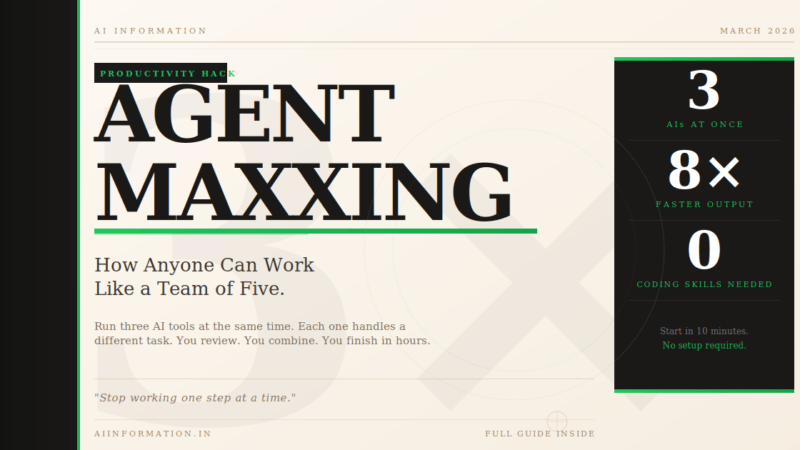
Quick Answer – What Is Agentmaxxing? Agentmaxxing means running multiple AI tools at the same time – each one handling a different task – while you review what they produce.
Instead of asking one AI to do one thing, you split your work into pieces and hand each piece to a separate AI. They all run simultaneously. You get everything done in a fraction of the usual time.
The simplest version: normal AI use is one conversation at a time. Agentmaxxing is running three at once.
Replit’s CEO is already hiring people specifically for this skill. A community grew around it almost overnight. And the best part – you can start right now with tools you already have, in the next ten minutes.
Table of Contents
The Morning That Made Me Take This Seriously
A developer I know described his morning to me a few weeks ago. He woke up, made a coffee, and started three things at once on his laptop.
One AI was rewriting a section of his code. A second was writing tests for that same code. A third was pulling together the documentation. All three were running in separate windows, completely unaware of each other.
He sat back down twenty minutes later. Two were done. He read through them, left a few notes, and merged the work together. The whole thing – which normally takes most of a morning – was finished before 10 AM.
That is agentmaxxing. And it is not just for developers.
Writers are using it to research, draft, and edit articles in parallel. Marketers are running competitor research on four companies at once. Business owners are handling work that used to need a team of three. The approach is the same no matter what you do.
If you have been hearing this word everywhere and want to understand what it actually means — and whether it could change how you work – you are in the right place.
What Does Agentmaxxing Mean?
The word follows the “-maxxing” pattern from internet culture. You have probably seen it before. Looksmaxxing means obsessively working on your appearance. Gymmaxxing means training to the absolute limit. Agentmaxxing means getting the maximum possible output from AI tools by running as many as you can at the same time.
In plain terms: you take one big task, break it into smaller independent pieces, and give each piece to a separate AI running simultaneously.
Here is the simplest comparison:
| The old way | Agentmaxxing |
|---|---|
| Ask one AI one thing | Give 3 AIs 3 different tasks |
| Wait for the answer | All 3 work at the same time |
| Ask the next question | Review all 3 when they finish |
| Repeat, step by step | Combine results – you’re done |
The key word is parallel. Not one after the other. All at the same time.
Think of it like a restaurant kitchen. A solo cook makes one dish, plates it, then starts the next. A proper kitchen runs the starter, main, and dessert simultaneously. The food arrives faster, and you only needed one head chef to make it happen.
Agentmaxxing makes you the head chef.
How Is Agentmaxxing Different From Just Using AI Normally?
This is the most common question and the answer comes down to one word: parallelism.
When you use Claude, ChatGPT, or any AI tool normally, you are in a back-and-forth conversation. You type something. You wait. You read the response. You type again. Even when the AI is fast, it is still sequential – one thing at a time.
Agentmaxxing breaks that completely. Instead of one conversation, you have three or four running simultaneously, each one handling a completely different piece of your work. You are not waiting for one to finish before starting the next. You start them all together.
Something important shifts when you do this. The bottleneck is no longer the AI’s speed. It is how fast you can review and combine what comes back.
It is also different from something called multi-agent AI frameworks – technical systems like CrewAI where AI tools coordinate with each other automatically. In agentmaxxing, you are the coordinator. You do the splitting, the assigning, and the combining. The AIs just do their individual tasks and stay out of each other’s way.
This means you do not need any technical setup to start. Three browser tabs is genuinely all it takes.
Why Is Everyone Talking About Agentmaxxing Now?
This approach has been imagined for years. So why is it suddenly everywhere in 2026? Three things happened at the same time.
AI tools became good enough to work on their own. Until recently, most AI tools needed constant hand-holding. You had to guide every step, correct mistakes frequently, and check every paragraph. The latest generation is different. Anthropic’s own data shows the average Claude Code session grew from 4 minutes to 23 minutes in a single year. These tools now handle long, complex tasks without needing you to hold their hand.
Running multiple AIs at once got easy. You do not need to be a programmer to open three browser tabs. The simplest version of agentmaxxing requires nothing more than that — no special software, no setup, no technical knowledge. More advanced tools exist for those who want them, but the basic version is available to anyone right now.
A community formed almost overnight. Agentmaxxing has its own subreddit, dedicated tools, and its own vocabulary. Replit’s CEO said publicly that his company hires people specifically for their ability to orchestrate AI tools rather than just use them. The McKinsey State of Organizations 2026 report found that 27% of young business leaders already expect AI to act as an autonomous teammate within two years. The momentum is real.
How Agentmaxxing Works: 4 Simple Steps
Whether you write code or have never opened a terminal in your life, agentmaxxing follows the same four steps every time.
Step 1 – Break Your Work Into Independent Pieces
This is the most important step, and the one where most people make mistakes early on.
You need to split your big task into smaller tasks that can happen without depending on each other. The rule is simple: if Task B needs the result of Task A before it can begin, they cannot run at the same time.
A bad split: AI 1 writes the article. AI 2 edits the article that AI 1 just wrote. Problem: AI 2 cannot start until AI 1 is completely done. Still sequential.
A good split: AI 1 researches Competitor A. AI 2 researches Competitor B. AI 3 researches Competitor C. All three are completely independent. All three start at the same time.
Spend the most thought here. Clean decomposition is what makes everything else work.
Step 2 — Give Each AI One Clear, Specific Task
Open a separate window or tab for each piece of work. Give each AI one focused prompt covering exactly what it should do – and what it should not do.
Vague prompt: “Research Competitor A.” Specific prompt: “Research Competitor A’s pricing, main features, and their top 3 customer complaints from the last 6 months. Keep it under 400 words.”
The more specific you are, the less time you spend correcting output later.
Start them all at the same time and step back.
Step 3 – Review Each One as It Finishes
This is your actual job in the agentmaxxing workflow.
While the AIs work, you do something else. When the first one finishes, you read it, check if it is on track, note anything that needs correcting. When the second finishes, same process. Then the third.
The skill you are developing here is knowing when output is good enough to use and when an AI has gone off track and needs better instructions before you waste more time on it.
Step 4 – Combine and Finalise
Once all the pieces are done, you bring them together. You can do this yourself, or give the combined output to one final AI with a prompt like:
“Here are three separate research summaries. Combine them into one structured report with an executive summary and a comparison table.”
Then you review the final result, make any edits, and you are done.
That is the complete agentmaxxing loop: break it down, run in parallel, review, combine.
A Real Example That Anyone Can Try Today
You run a small business and need three blog posts written this week. Normally this takes two full days of work.
With agentmaxxing:
Tab 1: “Write a 600-word blog post about [Topic A]. Start with a short story or relatable scenario. Include three practical tips with examples. End with a clear call to action. Write in a friendly, conversational tone.”
Tab 2: “Write a 600-word blog post about [Topic B]. Start with a short story or relatable scenario. Include three practical tips with examples. End with a clear call to action. Write in a friendly, conversational tone.”
Tab 3: “Write a 600-word blog post about [Topic C]. Start with a short story or relatable scenario. Include three practical tips with examples. End with a clear call to action. Write in a friendly, conversational tone.”
Start all three at the same time. Twenty minutes later, you have three rough drafts. You spend an hour personalising and editing each one. All three are done before lunch.
Same quality of output. A fraction of the time. No extra tools, no new software, no technical knowledge required.
The Tools People Use for Agentmaxxing
You do not need anything special to start. Here is the full picture from simplest to most powerful.
If You Are Not a Developer
Three browser tabs is genuinely all you need. Open Claude in one, ChatGPT in another, Gemini in the third. Give each a different task. That is real agentmaxxing — no setup, no cost, no technical skills.
If you want to go further, n8n, Relay.app, and Gumloop let you build more structured workflows visually. You connect multiple AI tools into a pipeline – one feeds into the next — without writing any code. These are worth exploring once you have done the three-tab version a few times and want something more organised.
If You Are a Developer
cmux is the tool most developers are talking about right now. It launched in February 2026 and hit 7,700 GitHub stars in its first month — which is unusually fast adoption for a terminal tool. It is a macOS terminal built specifically for running multiple AI coding tools at once. It shows all your active sessions in one screen, tells you when each one finishes, and handles five agents running simultaneously without slowing down.
NTM (Named Tmux Manager) is the best option if you are not on macOS. It wraps the standard tmux terminal with named labels for each session, automatic warnings when two agents try to edit the same file, and a status dashboard showing everything at once. Free, open-source, works on Mac, Windows, and Linux.
For running large numbers of sessions unattended, AMUX gives you a web dashboard to monitor everything from a browser. Git worktrees are the underlying technical feature that gives each AI coding agent its own isolated workspace so they never interfere with each other. Claude Code Agent Teams — currently in testing – lets one Claude session automatically manage several others as a team lead.
What Actually Goes Wrong (The Part Most Guides Skip)
Anyone telling you agentmaxxing works perfectly without effort is leaving out the important parts. Here is what genuinely goes wrong.
Running too many at once starts to hurt. Most people hit a natural wall around three or four AIs running simultaneously. Beyond that, the output piles up faster than you can review it and you end up with a backlog that takes longer to work through than if you had just done things one at a time. Start with two. Work up from there.
A bad task split wastes everything. If you split tasks that turn out to depend on each other, both AIs produce work that cannot be cleanly combined. You lose the time they spent and have to start over. This happens to everyone at first. It gets faster to spot with practice.
Three confident wrong answers is worse than one. Running three AIs in parallel does not make any individual one more accurate. It means three of them can go in the wrong direction before you check in. Review early on longer tasks, not just at the end.
AIs lose track on very long tasks. Each AI can only hold a certain amount of context in memory at once. On very long or detailed tasks, they start forgetting decisions made earlier. Keep individual tasks focused and well-defined to avoid this. Shorter, more specific tasks produce cleaner output than broad open-ended ones.
For most people, two to three tasks running in parallel is the genuine sweet spot – real time savings without the review load becoming overwhelming.
Why Agentmaxxing Is Bigger Than Just a Time-Saver
Here is the part most articles are not talking about enough.
Agentmaxxing is not just a way to work faster. It is a shift in what kind of skill is valuable.
Replit’s founder Amjad Masad said it openly: his company hires new graduates specifically for their ability to manage and direct AI tools, not for their ability to write code themselves. The job title “Agent Orchestrator” – someone who breaks down complex work, directs AI tools to handle it, reviews the output, and delivers a clean result – is beginning to appear in listings at AI-first companies.
The person who can do this well produces output that looks like it came from a team of four or five people. That skill is fundamentally about clear thinking and good judgment, not technical ability. It is becoming genuinely valuable right now and is not yet widely taught anywhere.
The knowledge workers getting ahead in 2026 are not always the smartest or the fastest. They are the ones who figured out how to run three AI conversations while everyone else is still having one.
How to Start Agentmaxxing in the Next 10 Minutes
You do not need to download anything, create any account, or learn any new software. Here is the fastest possible start:
- Think of one piece of work you could split into three independent tasks. Research, writing, analysis, planning – anything works.
- Open three browser tabs. Use Claude, ChatGPT, Gemini, or the same tool three times. It does not matter.
- Write one specific prompt in each tab covering one of your three tasks. Be clear about exactly what you want and what format you want it in.
- Start all three and do something else. Make a coffee. Reply to a message. Do not watch them work.
- Come back when the first finishes. Read it, check if it is useful, note any corrections.
- Review the others as they arrive and combine the results.
If the output is useful, you have just done your first agentmaxxing session. Make the next one more ambitious.
Frequently Asked Questions
Do you need technical skills to agentmax?
Not at all. The three-browser-tab version requires no technical knowledge. The skill you are actually building is how to break work into independent parallel tasks – which is a thinking skill, not a coding skill. Writers, marketers, researchers, and business owners all use agentmaxxing without any developer background.
How is agentmaxxing different from just using AI?
Normal AI use is sequential – one prompt, one response, one next prompt. Agentmaxxing is parallel – multiple AI tools handling separate tasks at the same time while you review. The difference becomes significant on anything larger than a single quick question.
How many AI tools should you run at once?
Start with two. Once you are comfortable reviewing and combining output from two at once, try three. The practical sweet spot for most people is two to four. Beyond that, review time starts cancelling out the time savings.
Is agentmaxxing the same as multi-agent AI like CrewAI?
No. In systems like CrewAI, the AI tools communicate with each other automatically. In agentmaxxing, you are the one coordinating – you split the work and combine the results. It is simpler, works with any AI tool you already use, and requires no technical setup.
What is an Agent Orchestrator?
An emerging job title for someone who manages parallel AI workflows – splits work into tasks, directs AI tools to handle them, reviews the output, and combines results – rather than doing the underlying work directly. It is appearing in job descriptions at AI-forward companies in 2026.
Will everyone be doing this eventually?
Almost certainly. Right now it gives you a meaningful advantage because most people have not tried it yet. In a few years, running tasks across multiple AI tools in parallel will likely be as normal as having multiple browser tabs open. The people learning it now will have a significant head start.
The Bottom Line
Agentmaxxing is simpler than it sounds.
Instead of asking one AI to do one thing, you split your work and ask three to do three things at the same time. Break it down, run them in parallel, review what comes back, combine it.
You can try it in the next ten minutes with tools you already use. No setup, no new accounts, no cost.
The people working at a level that looks like a team of five right now are not superhuman. They just figured out how to have three AI conversations while everyone else is still finishing their first one.
Related reading on AI Information:
- What Is an AI Agent? How They Work and Free Tools to Try (2026)
- What Is Agentic AI? How It Is Different From Regular AI
- What Is Vibe Coding? The Beginner’s Guide (2026)
- What Is n8n? The No-Code Automation Tool Explained
Sources and References
Every factual claim in this article is sourced below. You can verify each one directly.
1. Anthropic — Claude Code session data (78% multi-file edits, session length growth) Anthropic official news. Claude Code adoption and usage statistics, Q1 2026. → https://www.anthropic.com/news/claude-code
2. Reddit — r/agentmaxxing community The active agentmaxxing subreddit where developers share workflows, tools, and real-world examples. → https://www.reddit.com/r/agentmaxxing/
3. cmux — GitHub repository (7,700 stars in first month) cmux is a macOS terminal multiplexer built specifically for running multiple AI coding agents in parallel. Star count verified March 2026. → https://github.com/cmuxapp/cmux
4. Git — Official documentation for git worktrees Git worktrees allow multiple working directories to share a single repository — the core isolation feature that makes parallel AI agents possible without merge conflicts. → https://git-scm.com/docs/git-worktree
5. McKinsey & Company — State of Organizations 2026 McKinsey’s annual organizational leadership report, which found that 27% of leaders aged 18–24 expect AI to function as autonomous, agentic teammates within two years. → https://www.mckinsey.com/capabilities/people-and-organizational-performance/our-insights/state-of-organizations
6. Replit — CEO Amjad Masad on hiring Agent Orchestrators Amjad Masad, founder and CEO of Replit, has publicly stated that Replit prioritises hiring people who can orchestrate AI agents over those who simply write code. Referenced in X/Twitter posts and Replit company announcements, March 2026. → https://replit.com/
7. vibecoding.app — Agentmaxxing deep dive (source for tool details and workflow patterns) Comprehensive technical breakdown of agentmaxxing tools including cmux, NTM, AMUX, Conductor, and git worktrees. Published March 18, 2026. → https://vibecoding.app/blog/agentmaxxing
Last updated: 21, March 2026. All statistics and tool details reflect information available at time of publication. AI tools and their capabilities change rapidly – always verify current features directly with the source.

Leave a Reply