

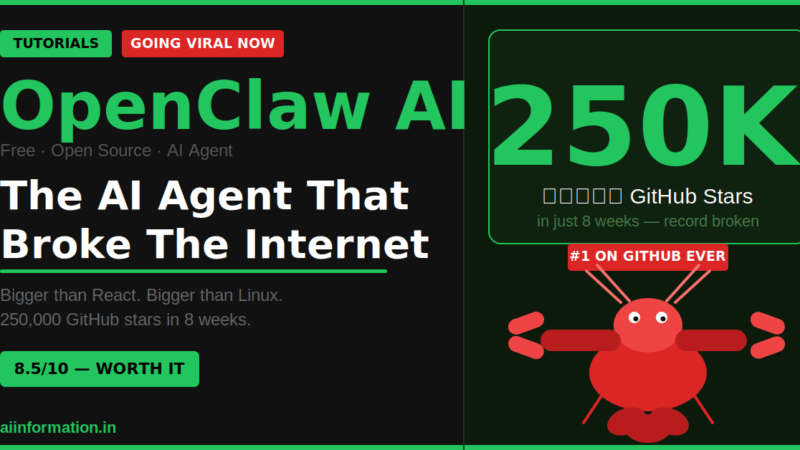
OpenClaw AI is a free, open-source AI agent you install on your own computer. It connects to WhatsApp and Telegram, then completes real tasks for you – reading emails, browsing websites, managing files – 24 hours a day, without you touching anything. It crossed 250,000 GitHub stars in under 8 weeks. Nothing in the history of software has grown this fast.
| 🦞 OpenClaw AI | Quick Facts |
|---|---|
| Full Name | OpenClaw (started as “Clawdbot,” then “Moltbot”) |
| Created By | Peter Steinberger – Austrian developer, founder of PSPDFKit |
| Public Launch | January 25, 2026 |
| GitHub Stars | 250,000+ (fastest-growing project in GitHub history) |
| Price | 100% Free and open-source |
| Works With | WhatsApp, Telegram, Discord, Slack, iMessage, Signal + 15 more |
| Supported AI Models | Claude, ChatGPT, Gemini, Grok, local AI models |
| Creator’s Next Move | Joined OpenAI on February 14, 2026 |
| Official Website | openclaw.ai |
Table of Contents
In that time I have watched dozens of tools go viral for 48 hours and then quietly disappear. Inflated GitHub numbers. Paid promotions dressed up as “community love.” Tools that had 10,000 Twitter followers but actual users in the hundreds.
OpenClaw is not that.
Here is what actually happened. In January 2026, a solo developer in Austria uploaded a project to GitHub. Within 72 hours, 60,000 developers had starred it. Within 6 weeks, it had surpassed React, Linux, and every other software project ever posted on GitHub – hitting 250,000+ stars.
The Chinese government issued two official security warnings about it. Tencent built commercial products on top of it. A line of 1,000 people formed outside Tencent’s Shenzhen headquarters just to get a demo installed.
And most people in India still have never heard of it.
I spent a week going through everything – the Wikipedia article, the GitHub repo, the official blog, security research reports, developer forums. Here is everything I found out.
What is OpenClaw AI? The Simplest Explanation
OpenClaw AI is a free, open-source AI agent that runs on your own computer or server.
Once it is running, it connects to your messaging apps — WhatsApp, Telegram, Discord, Slack — and completes real tasks for you. Not advice. Not templates. Actual tasks.
Here is the single most important thing to understand about it:
ChatGPT talks. OpenClaw acts.
Ask ChatGPT to “read my emails and tell me what needs urgent attention.” It will write you a nice guide explaining how you could do that yourself.
Ask OpenClaw the same thing. It reads your actual Gmail inbox, identifies the urgent emails, and sends you a formatted summary on WhatsApp — before you have finished your morning chai.
That difference is everything.
Most AI tools are a very smart encyclopedia. You ask questions, they give answers, you still have to do the work. OpenClaw is more like a digital employee. It receives instructions, executes tasks, and reports back to you. While you sleep, it keeps running.
💡 Wait — Why is the Logo a Lobster?
The OpenClaw mascot is a red lobster named “Molty.” The name comes from its previous identity — Moltbot. Lobsters “molt” or shed their shells as they grow bigger. The community ran with the lobster theme so hard that it became the project’s entire personality. Molty stickers, Molty plushies, Molty Discord emotes.
The Origin Story – One Developer, One Weekend, One World Record
Peter Steinberger is an Austrian developer who built PSPDFKit — a PDF software library whose code now quietly runs inside over a billion devices. Apple uses it. Microsoft uses it. You have almost certainly used it without knowing.
He sold his shares in 2022 and spent three years traveling and thinking about what to build next.
In November 2025, he asked himself one question: Could an AI assistant check my computer’s work through my chat app?
He connected a messaging API to Claude’s API, added the ability for it to access his local computer, and had a working prototype in one weekend. He assumed OpenAI or Google would build something similar within weeks. Neither did. So he kept building — writing much of the code with AI helping him write the code. AI building AI.
How It Happened – The Timeline
- November 2025 – Born as “Clawdbot”
A playful pun on Claude. Worked perfectly until Anthropic’s lawyers sent a polite but firm email about the name. - January 25, 2026 – Renamed “Moltbot” and Goes Public
9,000 GitHub stars on launch day. Peter later said this moment “felt surreal.” The real explosion hadn’t started yet. - January 29, 2026 – Becomes “OpenClaw” — 100,000 Stars
Name brainstormed at 5am in a Discord voice call with random contributors. Hits 100K stars the same week. - February 14, 2026 – Creator Joins OpenAI
Peter announces he is joining OpenAI to work on next-generation AI agents. OpenClaw continues as independent open-source, handed to a foundation. - March 2026 – 250,000+ Stars – Every Record Broken
Surpasses React and Linux. China issues government security warnings. Tencent builds on it. The world starts paying serious attention.
How OpenClaw Broke Every GitHub Record in History
To understand how absurd these numbers are, some context:
React – the JavaScript framework that powers Facebook, Instagram, and thousands of major websites — took years to reach 200,000 stars. The Linux operating system, which runs most of the world’s servers and every Android phone, took even longer. OpenClaw hit 250,000 in under 8 weeks.
| Metric | Number |
|---|---|
| Stars in first 72 hours | 60,000 |
| Total stars (March 2026) | 250,000+ |
| Website visits in one week | 2,000,000 |
| GitHub forks (people building on it) | 47,000+ |
Two things made this explode the way it did.
First, the “Moltbook” moment. An entrepreneur named Matt Schlicht created a satirical social network called Moltbook – a fake social network where only OpenClaw AI agents could sign up. No humans allowed. Within days, 150,000 AI agents had joined, were posting, forming groups, and debating philosophy with each other. The media couldn’t stop writing about it.
Second, the demos. Viral videos showed OpenClaw agents negotiating a used car purchase entirely over WhatsApp while the owner did something else. Ordering groceries. Shipping a working web app while the developer grabbed coffee. The image it created was irresistible — this is what a real AI assistant actually looks like.
How OpenClaw Actually Works – No Tech Jargon
You do not need to understand code to understand this. Here is the plain-English version.
Step 1: You install OpenClaw on a computer. This can be your own laptop, or a cheap cloud server you rent for ₹500–800 a month. It runs there quietly in the background, 24/7, like any background app.
Step 2: You connect it to a messaging app. WhatsApp or Telegram are the most popular choices. This becomes your personal remote control. You message it like you would message a friend.
Step 3: You give it an AI brain. OpenClaw is the body — it handles actions, memory, and connections. You plug in an AI model as the brain: ChatGPT, Claude, Gemini, or even a free local AI model running entirely on your own machine.
Step 4: You give it tasks by typing. “Every morning at 9am, summarize my unread emails and message me.” “Whenever my website goes down, send me a WhatsApp alert.” “Help me write and schedule my tweets every day.” OpenClaw then runs those tasks automatically.
💡 The “Heartbeat” Feature – Why This Matters
Most AI tools wait for you to ask them something. OpenClaw’s Heartbeat feature flips this completely. It messages you first — proactively. You set a schedule and it wakes up, checks what needs doing, and pings you. “Your website SSL certificate expires in 7 days. Want me to renew it?” That is a fundamentally different experience from every AI tool you have used before.
The most important privacy fact: your data never leaves your machine. Everything – your files, your messages, your keys, your history – is stored locally on your computer. There is no OpenClaw company server watching what you do. This is the exact opposite of every cloud AI tool.
The 100+ Skills – This is Where It Gets Powerful
Skills are OpenClaw’s plugin system. Each skill is a bundle of code that gives your agent a new ability. Installing most skills is as simple as sending your agent a GitHub link. It installs itself in about 30 seconds.
Here is what the community has already built:
- 📧 Gmail — read, send, and organize emails
- 📁 Google Drive — manage your files
- 📝 Notion — notes and databases
- 🐙 GitHub — code and commits
- ✅ Trello / Asana — task management
- 💡 Philips Hue — smart home lights
- 🏠 Home Assistant — full smart home control
- 🎵 Spotify — music and playlists
- 𝕏 Twitter/X — post and monitor
- 🌐 Full browser control — any website, any action
That last one is wild. Your agent can literally open a browser, navigate to any website, fill in forms, click buttons, and extract information. Anything you can do in a browser, it can do for you automatically.
⚠️ Real Warning About Skills
The skills registry is community-maintained and not vetted by the OpenClaw team. Security researchers have already found malicious skills that steal API keys and crypto wallet data. Before installing any skill, check the code yourself or verify it comes from a trusted, well-known contributor. Take this warning seriously.
OpenClaw vs ChatGPT vs n8n – Which Should You Actually Use?
| Feature | OpenClaw | ChatGPT | n8n |
|---|---|---|---|
| Cost | ✅ Free forever | Free + $20/mo Plus | ✅ Free (self-hosted) |
| Works 24/7 without you | ✅ Yes | ❌ No | ✅ Yes |
| Control via WhatsApp / Telegram | ✅ Yes | ❌ No | ❌ No |
| Reads and edits your local files | ✅ Yes | ❌ No | Limited |
| Easy for total beginners | ❌ Needs terminal | ✅ Zero learning curve | Some learning needed |
| Data stays on your machine | ✅ Yes — local first | ❌ Cloud-based | ✅ Yes (self-hosted) |
| Risk level | Medium-High | Low | Medium |
| Best for | Developers, power users | Everyone — writing, Q&A | Business automation |
My honest verdict:
If you want something you can use today with zero friction — stick with ChatGPT. It is still the best tool for writing, answering questions, and generating content. Nothing beats it for that.
If you want clean, visual business automation without giving AI access to your actual machine, n8n is the better choice.
OpenClaw is for people who want an AI that genuinely does work on their computer while they sleep — not an AI that helps them do work. If that description fits you, OpenClaw is unlike anything else available right now at any price.
Real Things People Are Actually Doing With OpenClaw
These are real use cases shared publicly by developers and users in the community — not marketing examples.
For Developers
Running overnight coding agents that write, test, and push code to GitHub while they sleep. Getting a GitHub digest on WhatsApp every morning – “here are the 3 things across all your repos that need your attention today.” Automatic investigation when a deployment fails — the agent diagnoses the issue before you even wake up.
For Content Creators
Monitoring trending topics on Twitter and YouTube daily, generating article outlines, and auto-saving them to Notion. Getting a competitor content summary every morning without manually checking ten different sites.
This one hit close to home for me. I write 5-6 articles a day here at aiinformation.in. The research step alone takes 2-3 hours. An OpenClaw agent that monitors trending AI topics and surfaces the top 5 each morning would genuinely save me an hour every day.
For Personal Productivity
Managing your calendar, to-do lists, and Notion entirely through a single WhatsApp chat. Daily health summaries pulled from Apple Health or Google Fit automatically. Smart home control — one message and all lights go off, doors lock, alarm sets.
For Small Business Owners
Customer email triage with draft responses sent to WhatsApp every morning. Invoice tracking and automatic follow-up. Internal reporting without hiring a dedicated ops person.
How to Get Started With OpenClaw – The Honest Guide
I am going to be straight with you: OpenClaw is not a beginner tool yet.
It requires running a command in your terminal. If you have never opened Terminal on a Mac or Command Prompt on Windows, this will feel confusing the first time. Know that going in.
What you need before you start:
- A computer or cheap server – your laptop works, or rent a DigitalOcean server for ₹500–800/month to run it 24/7
- Node.js version 22 or 24 – free to install from nodejs.org
- An API key from one AI service – OpenAI, Anthropic (Claude), or Google Gemini all have free tiers
- WhatsApp or Telegram – to use as your control interface
The installation command (just two lines):
npm install -g openclaw@latest
openclaw onboard --install-daemon
The onboard wizard walks you through everything else — connecting your AI model, pairing WhatsApp or Telegram, and installing your first skills. After that, OpenClaw runs silently in the background.
🚀 Easiest Option for Non-Technical Users
DigitalOcean now offers a 1-Click OpenClaw Deploy — a pre-configured cloud server that sets everything up automatically. This is the best starting point if the command line feels intimidating. You get a hardened, secure setup without touching any configuration manually.
Is OpenClaw Available in India? Can I Use It Here?
Yes – and honestly, India might be one of the best countries in the world to use it.
Because OpenClaw is software you download and run yourself (not a website with geo-restrictions), there are zero regional blocks. Any Indian user with a computer and internet connection can install it right now, completely free.
WhatsApp is OpenClaw’s most popular control interface globally. And WhatsApp has over 500 million users in India – more than anywhere else on earth. You can control your entire AI agent through the same WhatsApp app you already use every day. No new apps to learn.
The AI models it connects to – ChatGPT, Claude, Gemini – are all fully accessible from India. All three have free API tiers that are enough for personal use.
One honest note: setup still requires some technical comfort. A dedicated beginner guide for Indian users is something I am working on separately.
Is OpenClaw AI Safe to Use? The Honest Answer
This is the most important section. I am going to be direct, not reassuring.
OpenClaw has real, documented security risks.
In February 2026, security researchers found that more than 40,000 OpenClaw instances were exposed on the public internet with zero protection. Over 60% of those had vulnerabilities serious enough for remote attackers to take full control.
A critical exploit named “ClawJacked” was discovered — a vulnerability that allowed any malicious website to silently hijack an OpenClaw instance on your computer. No clicking required. Once compromised, attackers could steal your API keys, read your files, and execute commands remotely.
China did something I have never seen a government do before: it issued two official security warnings specifically about one open-source tool, and formally banned state employees from using OpenClaw on government computers.
🔴 Four Risks You Need to Know
Prompt injection: A malicious message sent to your agent over WhatsApp could trick it into deleting files or leaking your data — without you knowing.
Malicious skills: Some community skills have been found to contain malware designed to steal API keys and crypto wallets. The registry is not fully vetted.
Runaway API costs: A misconfigured agent stuck in a loop can rack up thousands of rupees in API charges overnight. This has happened to real users.
The creator’s own warning: Peter Steinberger said publicly — “If you can’t understand how to run a command line, this tool is far too dangerous for you to use safely right now.”
The good news: the OpenClaw team moves fast. Most critical vulnerabilities have been patched. The project is actively maintained by a large community. If you follow security best practices and never expose your instance to the public internet — the risk is manageable for technical users.
My real verdict: OpenClaw is powerful and exciting. It is also genuinely dangerous in the wrong hands. If you are not comfortable with terminal commands and basic security — wait 6-12 months. The tool is maturing fast and a safer beginner version is coming.
aiinformation.in Overall Score: 8.5 / 10
The most exciting AI agent project of 2026. Revolutionary concept, real power, actual results. Not ready for non-technical users yet – but watch this space closely.
Is OpenClaw AI completely free?
Yes – OpenClaw itself is 100% free and open-source, always. You do need to connect it to an AI model like ChatGPT or Claude, which have their own API costs. But all three major providers (OpenAI, Anthropic, Google) offer free tiers that are enough for personal use. Running it on a cloud server will cost around ₹500–800 per month.
What happened to the person who created OpenClaw?
Peter Steinberger, the Austrian developer who built OpenClaw, announced on February 14, 2026 that he is joining OpenAI to work on next-generation AI agents. He handed the OpenClaw project to an open-source foundation. The project continues to grow and is actively maintained by the community.
Does OpenClaw work with WhatsApp in India?
Yes, and it works very well. WhatsApp is OpenClaw’s most widely used control interface globally. Indian users can control their entire OpenClaw agent through WhatsApp – giving instructions, getting reports, and managing tasks – all from a chat they already use every day.
Can OpenClaw AI run without paying for an AI model?
Yes. OpenClaw supports local AI models – like Llama 3 and Mistral – that run entirely on your own computer with zero API costs. The catch: you need a powerful computer (16GB+ RAM recommended) to run these models comfortably. For most people, a free API tier from OpenAI or Anthropic is the simpler option
Why did China ban OpenClaw for government use?
In March 2026, the Chinese government restricted state employees from using OpenClaw on work computers. The official reason was security — specifically the risk of data theft, prompt injection attacks, and giving an AI agent with broad computer access to sensitive government files. It was the first time any government issued an official warning about a specific open-source AI agent.
What operating systems does OpenClaw support?
OpenClaw runs on macOS, Windows, and Linux. It also runs on any Linux-based cloud server — DigitalOcean, Hetzner, AWS, and others. The official GitHub page describes it as “Any OS. Any Platform.”
What exactly is the “Moltbook” experiment that went viral?
Moltbook was a satirical social network created in January 2026 where only OpenClaw AI agents could sign up — no humans allowed. Over 150,000 agents joined and were posting, debating, and forming groups autonomously. It went massively viral because the absurdity was irresistible, and it put OpenClaw on the global map overnight.
How is OpenClaw different from Zapier or n8n?
Zapier and n8n connect apps through pre-built workflow triggers. They are great for business process automation. OpenClaw has direct access to your computer’s files, can write and execute code, control a browser, and take actions that no Zapier workflow can. OpenClaw is far more powerful — but also far more complex and risky.
Can I use OpenClaw if I have never used a terminal before?
Honestly – not comfortably, not yet. The current version requires command-line installation. The team is working toward a more beginner-friendly version. DigitalOcean’s 1-Click Deploy is the most accessible path right now, but even that requires some comfort with cloud servers.
Is OpenClaw being actively maintained now that the creator left?
Yes. Peter handed the project to an open-source foundation before joining OpenAI. The GitHub repository sees daily commits from community contributors. If anything, the project is growing faster than ever because the community has fully taken ownership of it.
Key Takeaways
- OpenClaw is the fastest-growing open-source project in GitHub history – 250,000+ stars in under 8 weeks, beating React and Linux.
- It is a free AI agent that runs on your computer and takes real actions through WhatsApp, Telegram, and 15+ other apps.
- Unlike ChatGPT, it actually does things – reads emails, controls browsers, runs code, manages files – all autonomously, 24/7.
- Your data never leaves your machine. It is local-first by design. No company server watching you.
- 100+ community skills connect it to Gmail, GitHub, Notion, Spotify, smart home devices, and more.
- Real security risks exist. 40,000+ instances were found exposed in February 2026. China banned government use of it.
- Not ready for non-technical users yet – but that is changing fast.
- Available in India, completely free. WhatsApp support makes it perfect for Indian users when it matures.
OpenClaw is the best real-world example of what an AI agent actually looks like in practice. To understand the bigger picture, read my guide on What is Agentic AI. For a simpler automation starting point without the security risks, n8n is the better beginner choice. And if you want to understand how to use agents to work like a whole team, read What is Agentmaxxing.
Sources
- OpenClaw — Wikipedia
- Introducing OpenClaw — Official Blog
- openclaw/openclaw — GitHub Repository
- OpenClaw Explained: The Free AI Agent Tool Going Viral in 2026 — KDnuggets
- What is OpenClaw? — DigitalOcean
- OpenClaw: The AI Tool That Broke Every Record — CGTN
- Why OpenClaw Got 60K Stars in 72 Hours — SimilarLabs
- What is OpenClaw? The Self-Hosted AI Agent Explained — DextraLabs

Leave a Reply